

 Add SeoProfy as a preferred source on Google

Getting mentioned in AI-generated answers can shortcut your brand into a buyer’s shortlist before they ever click your site. But then they return to you through a branded Google search a few days later, and last-click attribution credits the sale to organic search, leaving leadership wondering whether AI visibility efforts are worth it.


To assess AI search ROI accurately and consistently, track visibility/demand signals and connect them with qualified leads and closed deals. Below, we’ll discuss a profit-based formula you can also use to compare the gross profit those sales brought to the program’s total cost.
We’ll also check the metrics and attribution workarounds you need to prove AI search is paying off, even when analytics tools don’t tell the whole story.
- AI search ROI shows the financial return from better brand visibility in AI-generated answers.
- AI recommendations could sometimes stand behind purchases made after a direct or branded search.
- Build an AI search visibility baseline, then add GA4, Search Console, forms, and CRM data.
- Calculate the return using attributable gross profit and the overall cost of the program.
- In reports, keep measured, self-reported, sampled, and modeled results separate.
What Is AI Search ROI?
AI search ROI is the financial return from your brand getting more visibility in AI-generated answers and receiving more leads and purchases, relative to the cost of that work. It covers platforms such as ChatGPT, Perplexity, Gemini, and Claude, alongside Google’s AI Overviews and AI Mode, with returns evaluated through attributable gross profit.
AI search visibility is a leading indicator, showing whether your brand appears in relevant answers, and you can notice changes in overall traffic and branded search relatively soon, sometimes within 30 days. However, metrics such as qualified pipeline and revenue take longer to develop because buyers still need time to compare providers and make a purchase decision.
Therefore, an AI visibility ROI report should follow that progression across several consistent reporting periods, allowing enough time for the company’s sales cycle before drawing a financial conclusion from improvements in mentions or source citations.
Why AI Search Is Hard to Measure with Standard Analytics
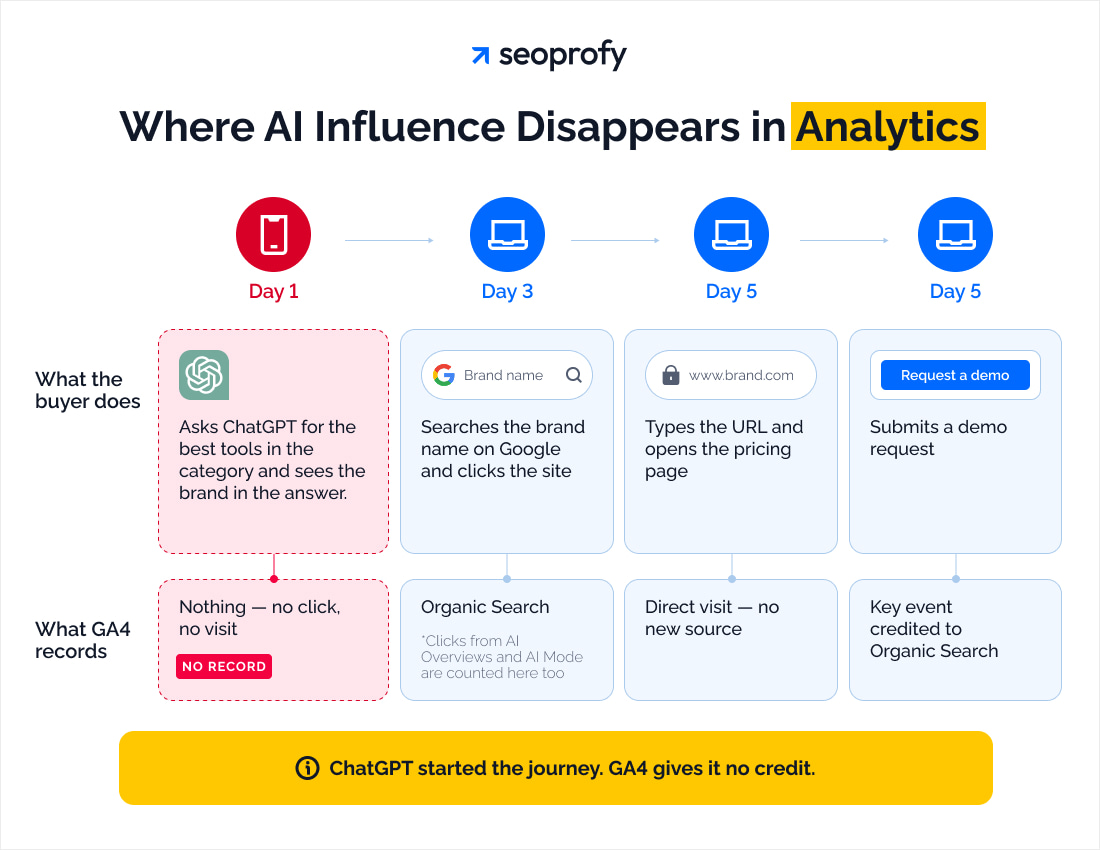
Some answers produce no visit. A buyer can read a recommendation and continue researching without opening your website. Pew Research Center’s 2025 study found clicks on traditional results in 8% of Google visits with an AI summary, compared with 15% in traditional search.
Some clicks lose their source. App and in-app visits can arrive without referrer information. These visits may appear as Direct, making it difficult to identify the platform that introduced the buyer in analytics.
Google combines different search experiences. GA4 puts clicks from AI Overviews and AI Mode inside Organic Search. That channel therefore combines conventional search visits with visits originating in Google’s AI features.
The buying journey crosses sessions and devices. Someone may research on a phone, then search a brand on a laptop before converting. Last-click attribution can credit that later branded search while missing the earlier AI interaction, obscuring the original discovery channel.
AI Search Metrics: What to Track and What to Ignore
Once you understand the general AI search statistics and market context, start tracking your brand’s AI visibility, demand, conversion, and revenue. Together, they create a full picture rather than working as isolated metrics.
| Layer | Key metrics | Where to get them | Evidence level |
| Visibility | AI share of voice, source citations, brand mentions | Fixed prompt checks, dedicated AI visibility tools | Sampled |
| Demand | AI referral traffic, branded search trends, landing-page visits | GA4, Search Console | Measured for tracked AI sessions; modeled for inferred influence |
| Conversion | Purchases, demo requests, qualified leads | GA4, forms, CRM | Measured or self-reported |
| Revenue | Closed-deal revenue, gross profit that attributes to AI search | CRM, financial records | Measured, self-reported, modeled (shown separately) |
To measure each layer accurately, use a specific evidence level. Here’s how they work:
Measured: Analytics shows that someone visited your website from an AI platform. Any resulting leads or sales can be linked to that visit through analytics or CRM records.
Self-reported: A buyer names an AI platform as a discovery or research source in a conversation or a “How did you learn about us?” form.
Sampled: A fixed prompt set shows whether the brand appears in AI answers, providing visibility evidence without establishing a connection to sales.
Modeled: A documented estimation that infers AI influence from correlated signals, such as changes in branded search alongside LLM visibility over the same reporting period.
Don’t rely just on the raw mention counts — while this metric shows how often the platform talks about your brand, it doesn’t take context into account. For example, the chatbot may mention your company as a bad example and recommend a competitor.
The same way, mentions in unrelated informational answers may also increase the total without reaching likely buyers (although being cited is a good sign).
How to Measure AI Search ROI Step by Step
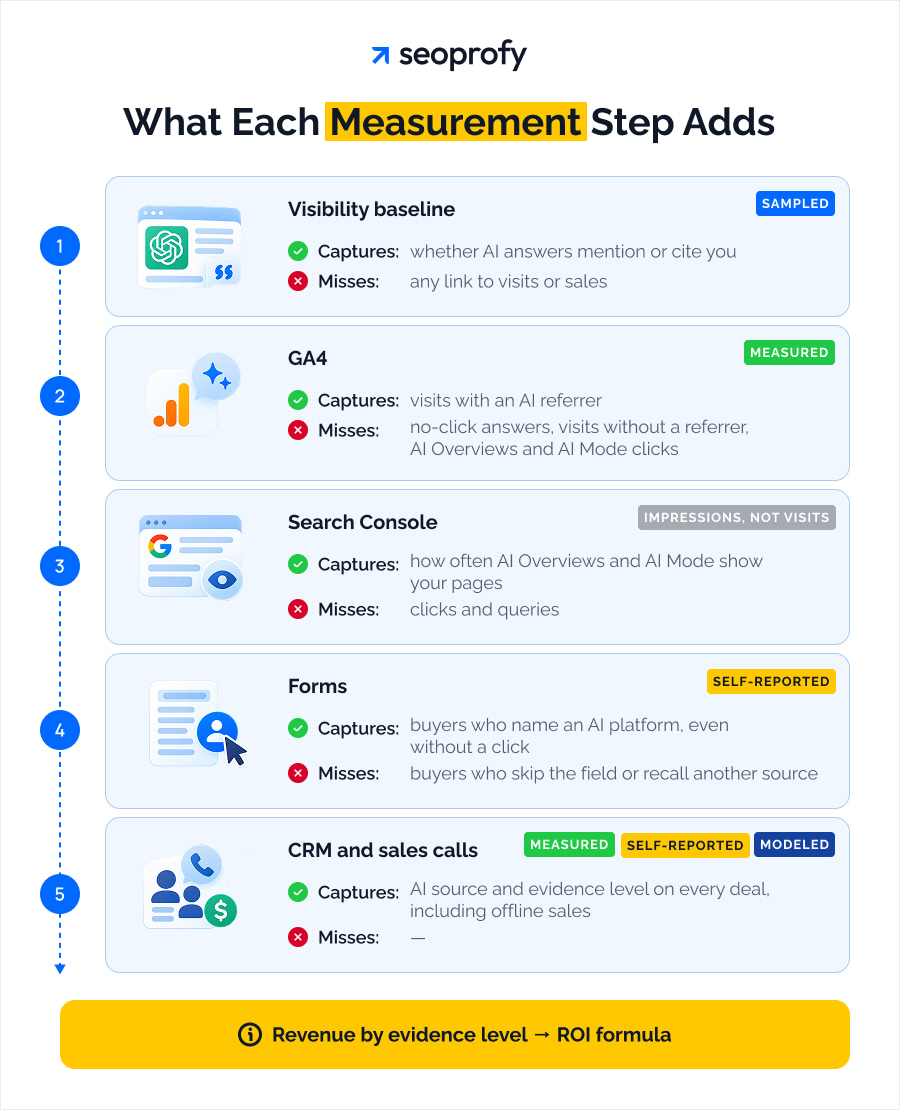
When tracking AI visibility’s impact on profit, the main pitfall is tracking metrics without tying them together and to the baseline. On its own, traffic, Google data, self-reported data, or CRM data can’t tell the whole story.
The five steps below put those scattered figures into an easy-to-understand algorithm that shows how AI helps turn searchers into qualified leads and closed deals.
When tracking, compare visibility trends with website activity and sales over the same period, like a month. Start by choosing a fixed set of buyer questions to track across the main AI platforms.
Step 1: Build an AI Visibility Baseline
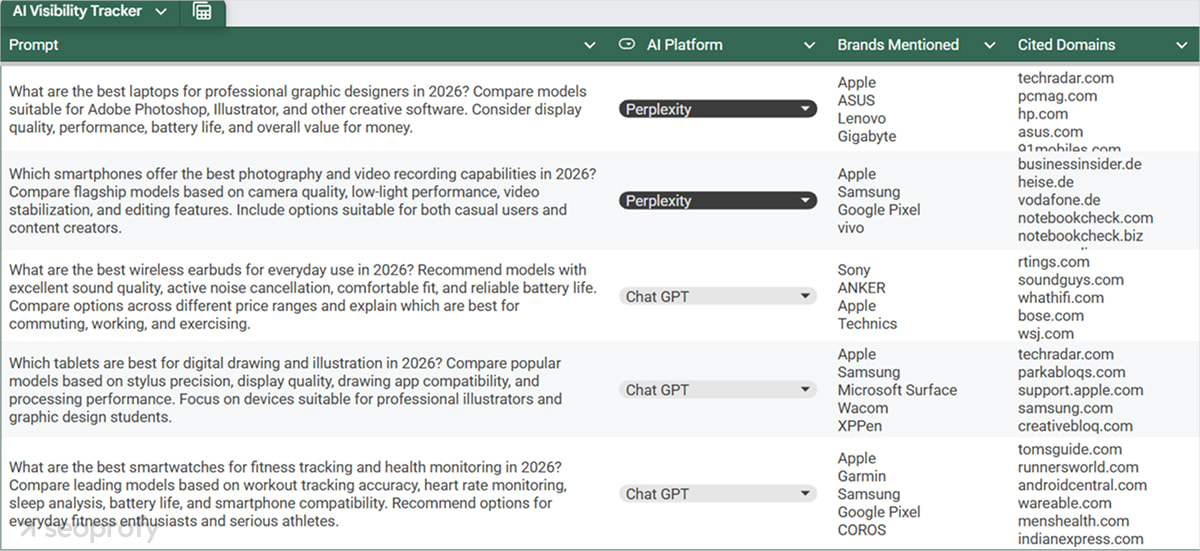
Start with 10–15 buyer prompts drawn from sales conversations and search research. Cover category questions and comparisons, along with pricing concerns and queries such as “best accounting software for a small agency.” Keep brand-name prompts and competitor-name prompts in separate groups.
Run the set across ChatGPT, Perplexity, Gemini, and Google AI Mode, plus Claude where your tool or manual checks support it. Keep language and country settings consistent, and align the tracking with your wider answer engine optimization strategy.
For every response, record whether your brand appears, whether your website is cited, and which competitors are mentioned. Save the answer with its platform and date, and add position within the response plus the sentiment where the tool supplies them.
LLM answers vary between runs. Try to review your results over the same period of time (like a month) and keep your prompt set fixed and record any changes (new or slightly varying prompts, a different pool of platforms, location settings, etc.) separately.
For closer-to-life results, prioritize commercial prompts over general informational questions. This way, you’ll see how your actions affect the brand’s AI share of voice in your target context, making these efforts more relevant in the general budget conversation.
Step 2: Track AI Referral Traffic in GA4
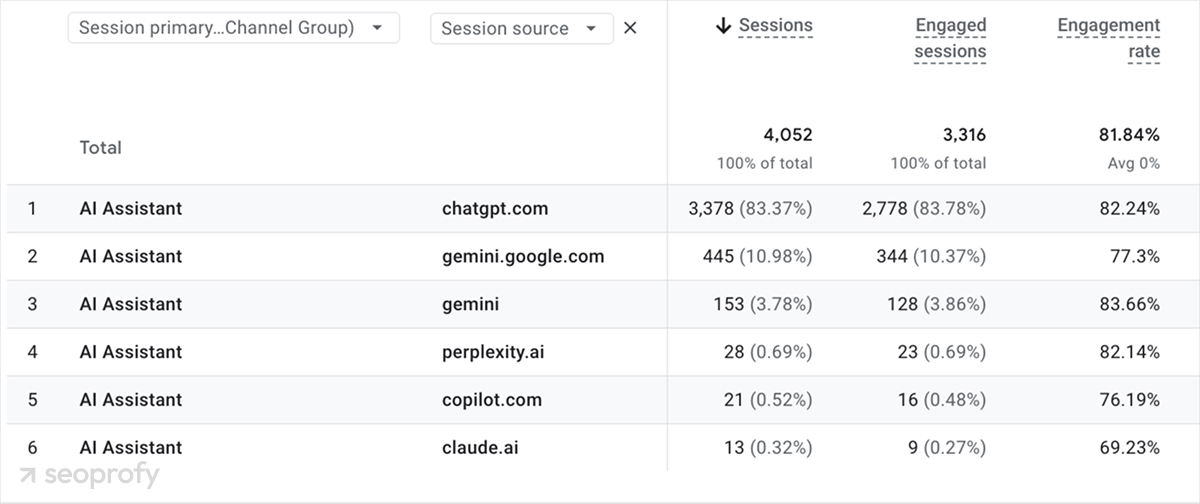
In GA4, go to Reports → Acquisition → Traffic acquisition; there, you can select the Session default channel group and look for AI Assistant. Google introduced the channel on May 13, 2026, to group visits from recognized AI referrers and assign the medium ai-assistant.
The AI Assistant channel only includes visits it recognizes as coming from AI platforms, and older visits keep their original labels. Some AI visits may appear under Referral or Direct, while clicks from Google AI Overviews and AI Mode are grouped under Organic Search.
To capture additional sources, open Admin → Data display → Channel groups → Create a custom group with an “AI assistants” channel and a Source condition that matches this regex:
^(chatgpt\.com|perplexity\.ai|gemini\.google\.com|claude\.ai|copilot\.microsoft\.com)$
Verify the domains against your actual Session source values and extend the expression for recorded variants. Place the channel above Referral and any other matching channel. Google’s custom channel groups can apply to historical data, provided the source was recorded.
Still, these rules can’t bring back missing source details. So think of the total you get as the amount of AI referral traffic you can actually spot. Look at landing pages and sessions side by side. This helps you see where buyers first land and if those pages help them take the step.
The landing-page view also lets you check if visitors find the info before doing something important like making a purchase or signing up. It’s good to know if they’re getting what they need to move. AEO tools can add visibility context to this analysis.
Step 3: Add Search Console’s Generative AI Report
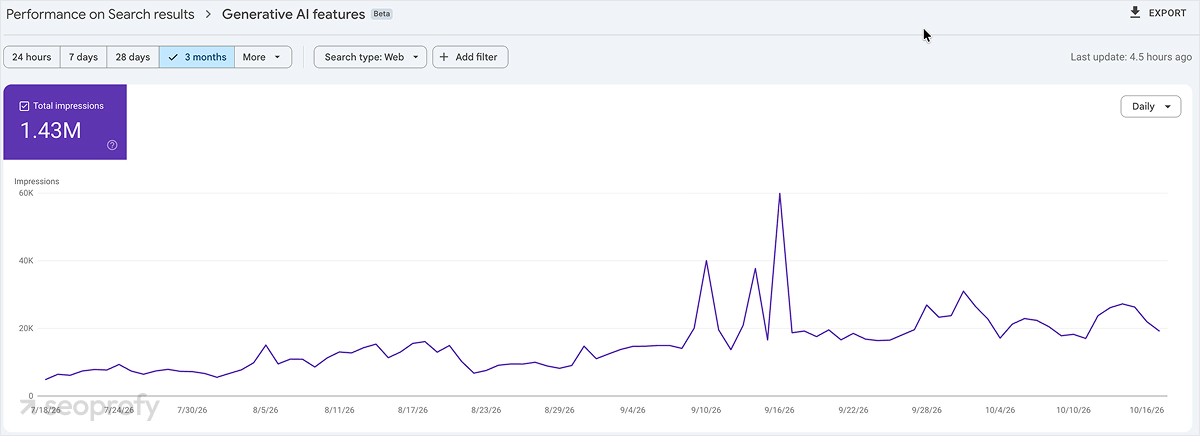
To see how often your pages get linked in Google AI Overviews and AI mode, open the Generative AI performance report in Search Console. That’s also where you can break impressions down by page, device, country, and date.
Google announced the report on June 3, 2026, and completed the worldwide rollout on August 31, 2026. It’s still relatively new, so if your report is missing, it could be due to insufficient impressions; give it more time.
As of October 2026, the documentation lists only impressions and the breakdowns above, but it doesn’t include clicks, CTR, or query data. Impressions only mean the AI feature showed the link, but they don’t prove the user actually clicked it.
To get more insight, you can export and compare data from your pages with GA4 landing-page sessions for the same date range while making sure to align the canonical URLs with landing pages as tracked by GA4 and checking whether pages that received impressions in Google AI Overviews and AI Mode also attracted visitors.
For better ranking in AI Overviews, use this page-level data to identify which pages to review first. For example, if there is an increase in impressions but no increase in traffic, the context of placement of the particular link may be worth a second look.
Step 4: Add Self-Reported Attribution to Your Forms
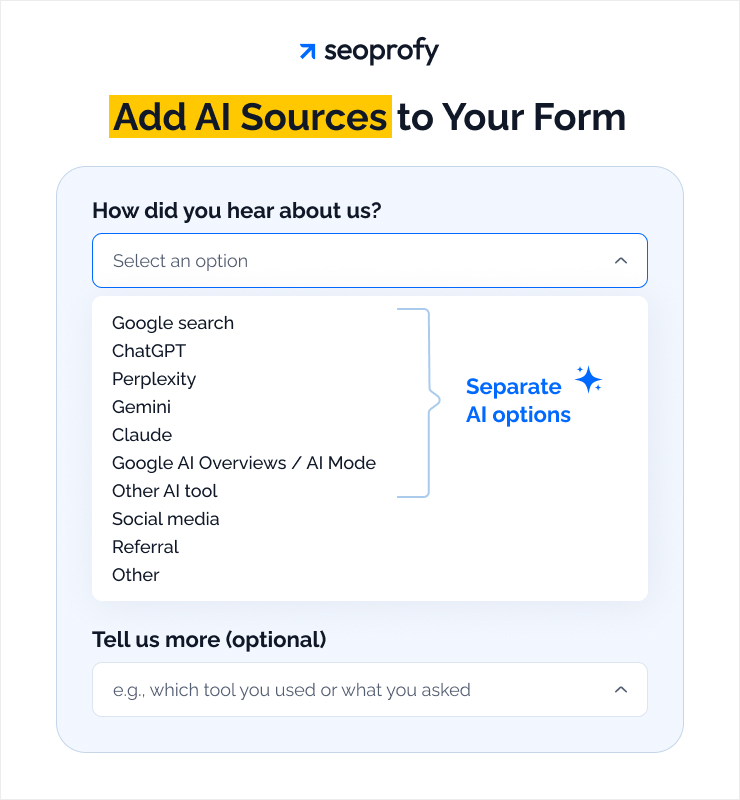
Add “How did you hear about us?” to demo, sign-up, and checkout forms, and include AI as one of the options. You can also give separate options for ChatGPT, Perplexity, Gemini, Claude, and Google AI Overviews/AI mode. For extra details, add a free-text field.
This will help you obtain real data from the customer as opposed to guesses made from the previous points. The answers may allow you to grasp the buyer journey better (i.e., time taken for research and brand presence in the response).
The structure may also help you determine where and how to present answers based on the platform your clients use. Keep the original response with the contact or order record so it stays available when you review the lead or sale.
When preparing the form, keep the AI-related questions short enough to answer without interrupting the flow. Before making the additional fields compulsory, test whether they actually affect transaction completion for checkout.
In your AI search ROI report, keep these figures separate and mark them as “self-reported.” Buyers may remember their most recent research source (even if they originally learned about you elsewhere), and most tend to ignore optional fields, so much of the customer base will be unrepresented.
Step 5: Tag Deals in Your CRM and Ask on Sales Calls
Create the fields in CRM for the AI discovery source, platform, and evidence level. Capture the supporting form submission, session notes, or a sales note in the opportunity record. Record the date of the information.
Use the levels from the metrics section: a tracked AI session supports measured attribution, a named buyer source gives self-reported attribution, and an inferred link is kept under modeled attribution along with its assumptions.
Train your sales team to ask how each prospect heard of the company. If the response is “online” or “research”, ask “which website/tool did you use?” Record every mention of AI, including whether it introduced the company or helped compare the vendors.
Make sure the closed deal record contains the information about the source of the lead and recognized revenue for the given period.
Keep evidence levels visible separately in the reports. If one deal has both tracked visit and buyer response, count it once and save both records. Keep modeled estimations apart as well.
Our AI SEO services include analysis of your brand’s AI search visibility and a strategy focused on measurable revenue growth. See how we assess opportunities and plan the work around your business goals.
How to Calculate AI Search ROI
Calculate AI search ROI using attributable gross profit and program costs for the period.
AI search ROI (%) = (gross profit from AI search − AI search costs) ÷ AI search costs × 100
Gross profit is revenue after the direct cost of supplying the product or delivering the service. It shows how much is available to recover the AI search investment. Revenue alone can overstate the return when fulfillment or delivery costs are substantial.
Calculate the total cost of AI search optimization from invoices and time records:
- Visibility monitoring and reporting tools
- Content research, production, and updates
- Digital PR and outreach
- Technical implementation
- Internal team and agency time.
For shared SEO work, allocate the bill by documented task hours. If 30% of a content project’s hours support AI search, charge 30% here and 70% to SEO. Apply the same rule each period and count the bill once.
Revenue and costs must cover matching 30-, 60-, or 90-day windows, selected to fit the sales cycle. A quarterly calculation should use revenue recognized during those 90 days, rather than the full future value of a newly signed contract.
Apply the formula only to traffic and deals you can reasonably tie to AI. Retain their evidence levels in the generative AI performance report and label estimated returns as modeled.
The following hypothetical examples show the calculation for a monthly ecommerce review and a quarterly B2B review.
Example: Ecommerce Store
Imagine an ecommerce website and how it could review the last 30 days of purchases in connection with tracked AI sessions. The figures below are for illustration purposes, so you can replace them with your own visit, purchase, and margin data.
| Input | Value | Result |
| AI visits and purchase rate | 2,400 × 2.5% | 60 orders |
| Average order value | 60 × $85 | $5,100 revenue |
| Gross margin | $5,100 × 40% | $2,040 gross profit |
| Monthly AI search costs | $1,500 | $540 above program costs |
| ROI | ($2,040 − $1,500) ÷ $1,500 × 100 | 36% |
In this example, AI visibility ROI is 36%: the store earned $1.36 for every dollar spent on AI search.
Purchases influenced by AI can still go uncounted when last-click attribution credits another channel and no connection to the earlier recommendation was recorded.
You can use this positive result when considering further investment. However, it also makes sense to check if the sales are spread across several landing pages or depend on one product or a short promotion.
A negative result would mean the attributed gross profit didn’t cover the program costs in that window. It can signal that you should review your AEO strategy and decide whether investing in another period is worth it.
Example: B2B or SaaS Company
Let’s look at a hypothetical B2B SaaS provider with a 90-day reporting period to match the sales cycle. Each closed deal contributes $9,000 in revenue recognized during the quarter.
| Input | Value | Result |
| Scenario AI visits and lead rate | 4,800 × 3% | 144 leads |
| Qualification rate | 144 × 25% | 36 qualified leads |
| Close rate | 36 × 25% | 9 deals |
| Revenue per deal during the quarter | 9 × $9,000 | $81,000 scenario revenue |
| Gross margin | $81,000 × 70% | $56,700 gross profit |
| Quarterly AI search costs | $18,000 | $38,700 above program costs |
| Modeled ROI | ($56,700 − $18,000) ÷ $18,000 × 100 | 215% |
The 215% ROI assumes AI contributed to all nine deals. The evidence for that connection differs:
| Evidence level | What we know | Deals | Quarterly revenue |
| Measured | A recorded AI visit is linked to the deal | 2 | $18,000 |
| Self-reported | The buyer said they found the company through AI | 4 | $36,000 |
| Modeled | Other data suggests AI influenced the deal | 3 | $27,000 attributed to AI by estimate |
Lead, qualification, and close rates must come from your own GA4 and CRM data. Modeled deals need a documented basis for assigning AI influence.
Exclude open opportunities from recognized revenue, even when sales expects them to close next quarter.
B2B figures need a longer window because evaluation, approval, and contracting can delay a sale beyond the first visit.
How AI Search Compares with SEO and Paid Channels
Compare AI search with organic and paid channels using your own records, matching reporting periods and the same conversion action. Keep the audience and landing-page mix visible, since a pricing-page visit and an informational article visit can reflect different buying intent.
| Metric | Formula | Where to pull it |
| Conversion rate | Sessions with a selected key event ÷ sessions × 100 | GA4: AI Assistant vs Organic Search and paid channels |
| Revenue per visit | Revenue ÷ sessions; estimated lead value ÷ sessions for B2B | GA4: same comparison, supported by CRM values |
| Cost per lead | AI search costs ÷ leads attributed to AI | CRM and cost records |
| CAC | AI search costs ÷ new customers attributed to AI | CRM and cost records, compared with organic and paid |
Use GA4’s session key event rate for the first row, with a purchase or qualified lead selected consistently. In this comparison, AI may be understated because Google AI Overviews and AI Mode clicks remain in Organic Search.
“AI visitors convert better” is a hypothesis to test with sufficient visits and completed conversions. Check whether any advantage persists across several periods before changing the channel budget.
How Long Does It Take to See Results?
AI search signals move on different schedules. Visibility and citations can change before identifiable visits increase, while revenue arrives after buyers complete their decision. Use the windows below to plan reviews, allowing for the work required and the time between discovery and purchase.
| Planning window | Signals to review |
| 0–30 days | Baseline visibility and citations |
| 30–60 days | AI referrals and branded search trends |
| 60–90 days | Leads and pipeline; possible first ROI signals where sales have closed |
| 90–180 days | Closed revenue and ROI across a fuller sales cycle |
These windows are adapted from vendor guidance, rather than independent research establishing typical result dates. Treat them as a planning guide without assuming that each milestone will happen on schedule.
Adjust the reviews to your own sales cycle, since a longer buying process pushes pipeline and closed revenue later.
Judge the trend across several periods, rather than drawing a budget conclusion from a single month.
How to Report AI Search ROI to Leadership
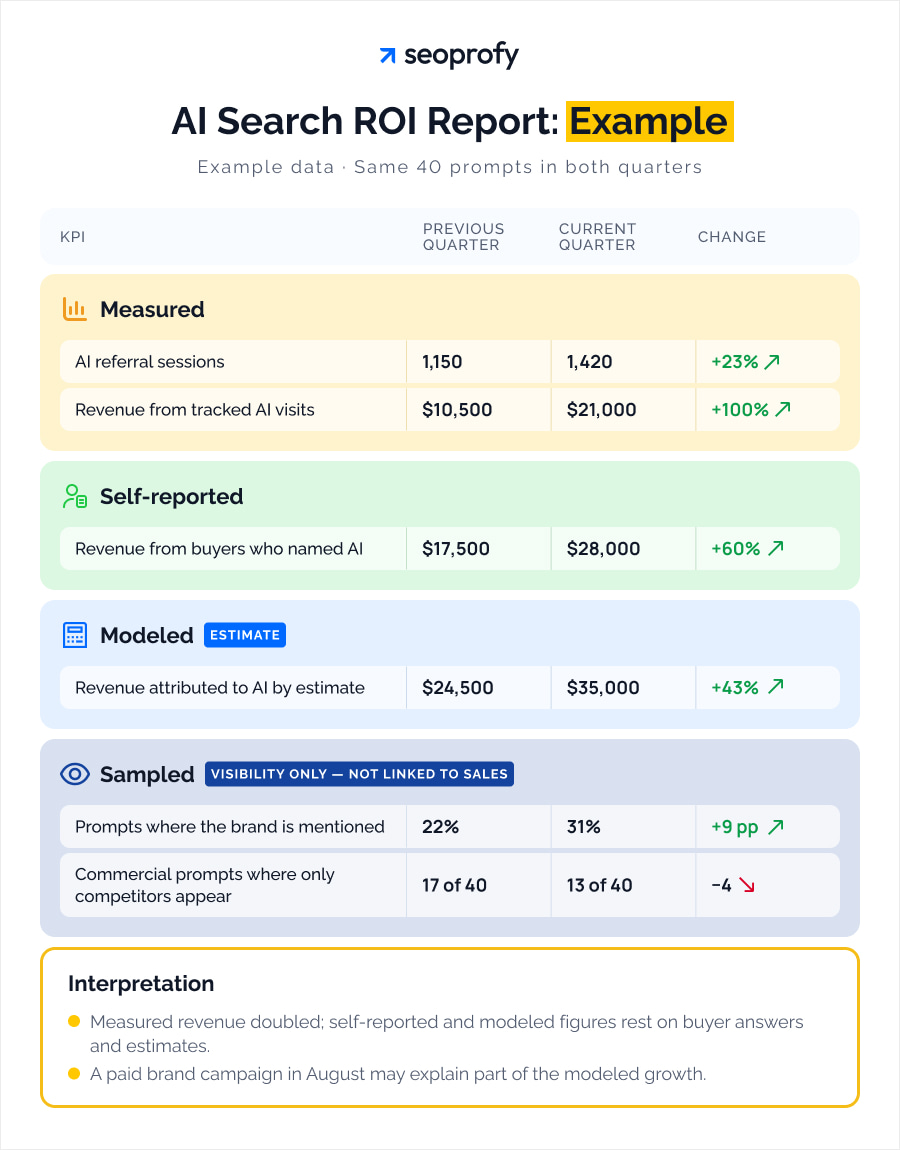
For a credible AI visibility ROI report, group KPIs by the four evidence levels discussed earlier: measured, self-reported, modeled, and sampled. When presenting them, show the previous period beside the current one, using the same prompt set and the same or a close time range (e.g., 1 month). If there have been any changes in prompt wording or platform coverage, show them beside the figures too.
Show three separate revenue figures: sales linked to tracked AI visits, sales from buyers who named AI as their source, and sales attributed to AI through estimates. Keeping them separate lets leadership see the evidence behind each amount.
Show sampled visibility, such as AI share of voice, alongside these figures. It shows where your brand appears in AI answers, without establishing a connection to sales.
A single “AI revenue” total would hide these differences and make buyer reports and estimates look as certain as tracked results.
Follow the figures with a short explanation of what changed in each group. More sales linked to tracked AI visits show growth in measured revenue; a higher share of prompts mentioning your brand shows improved visibility. For modeled revenue, explain which data or assumptions changed the estimate.
Also identify other marketing activities that could affect those estimates. Advertising can also drive searches, so some of the growth could come from that campaign.
Frequently Asked Questions
Does blocking OAI-SearchBot affect ChatGPT referral traffic and tracking?
Yes, blocking OAI-SearchBot can restrict your site’s inclusion in ChatGPT search results and reduce referral opportunities. OpenAI recommends allowing the crawler and its published IP addresses.
However, the block doesn’t disable GA4 tracking: human visits through existing links can still be recorded if your analytics setup captures them with their available referral source information.
How do I measure AI search ROI when sales happen offline or by phone?
Link your offline sales to the lead record in the CRM. You can also ask phone buyers how they found you and record the AI platforms they use.
If you can link a tracked AI visit to the customer, keep that visit in their CRM record alongside the sale amount and closing date.
Do I need paid tools to measure AI search ROI?
You can use free tools, including GA4, Google Search Console, and a spreadsheet or existing CRM for AI search ROI calculations. They are sufficient if you check a small, fixed set of prompts manually and retain form responses or sales notes.
You can switch to paid tools when the number of prompts and platforms is too great to process them manually without dedicating too much time and effort.
Proving AI Search ROI is a Process, not a Number
If spending looks justified only when including modeled returns, propose a limited test with a clear spending cap. If measured results support expansion, identify which pages or buyer questions produced the strongest AI visibility ROI before committing more resources.
The next quarter should answer a specific question: whether that proposed investment generates enough attributable gross profit to cover its cost within the agreed reporting window.

Julia Lubianytska is a Copywriting Team Lead at SeoProfy with over 7 years of experience in copywriting and editing. She works closely with copywriting teams, helping writers craft clear and thoughtful content for SaaS products, IT services, and businesses in the legal and medical fields. Julia enjoys turning complex topics into easy-to-understand, trustworthy content, focusing on structure, clarity, and consistency to ensure the content is genuinely helpful for real people, not just search engines.