


An enterprise SEO audit is an excellent way to conduct a comprehensive evaluation of a site with thousands or even millions of pages, using the most efficient techniques in 2025/2026. It focuses on different elements, including technical background, content, and backlink profile.


During such an audit, you can identify issues to address and opportunities to improve your online visibility. The information you obtain can form the basis for an efficient digital marketing strategy. In this guide, we’ll explain how to estimate different aspects of your website, which tools are the best to use, and what factors may affect the SEO audit cost. We’ll also review the factors to consider to get cited by modern LLM algorithms on ChatGPT, Claude, or AI Overviews.
- Enterprise analysis evaluates large-scale websites across technical, content, and backlink factors to improve visibility and performance.
- Proper analysis requires advanced tools, cross-team collaboration, and a structured workflow due to the scale and complexity involved.
- Data-driven prioritization (P1–P4) ensures efficient resource allocation and faster implementation of high-impact fixes.
- Continuous monitoring, reporting, and quarterly audits are essential for maintaining rankings and adapting to algorithm changes.
How Enterprise Audits Differ from Other SEO Audits
An SEO audit is a process for assessing how well your site is optimized for visibility in traditional search results and on AI platforms. However, there is a significant difference between evaluating enterprise websites and SMB (small and medium-sized businesses) websites. The comparison table below highlights the key differences between these two types of SEO audit:
|
SMB audit |
Enterprise audit |
|
| Average site size | Small (from 1 to 500 web pages) | Massive (thousands of web pages) |
| Keywords | Local keywords | Global, high-volume keywords and brand-related terms |
| Technical background | Basic (site speed, mobile friendliness, metadata optimization) | Complex (Crawl budget management, JavaScript, and API integrations require separate attention) |
| Team size | Small team of up to 10 experts | Multiple teams with dozens of professionals from different regions |
| Resource approval complexity | Direct access to decision-makers results in faster approval | Audit budget approval often requires the agreement of multiple stakeholders |
Enterprise SEO Audit Checklist Overview
Planning your enterprise analysis is as important as ensuring proper execution. If you do everything right, you’ll boost your SEO efforts and organic search performance. The following checklist will help you make sure you won’t miss any important steps during your audit:
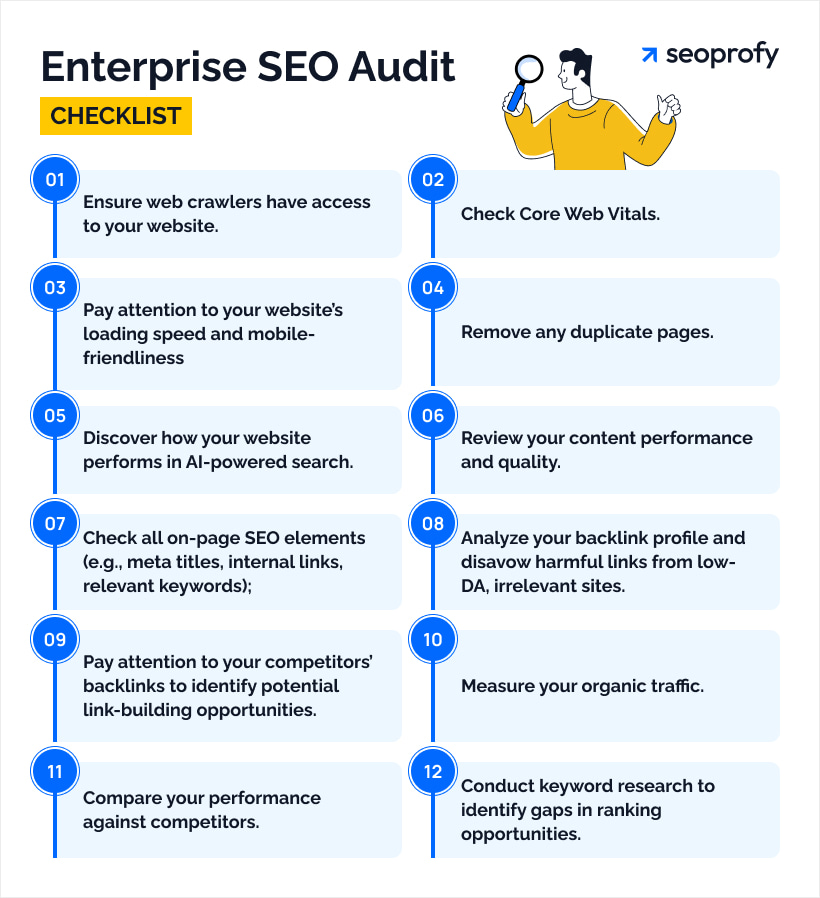
- Ensure web crawlers have access to your website.
- Check Core Web Vitals.
- Pay attention to your website’s loading speed and mobile-friendliness.
- Remove any duplicate pages.
- Discover how your website performs in AI-powered search.
- Review your content performance and quality.
- Check all on-page SEO elements (e.g., meta titles, internal links, relevant keywords).
- Analyze your backlink profile and disavow harmful links from low-DA, irrelevant sites.
- Pay attention to your competitors’ backlinks to identify potential link-building opportunities.
- Measure your organic traffic.
- Compare your performance against competitors.
- Conduct keyword research to identify gaps in ranking opportunities.
Checking and thoroughly reviewing all the elements mentioned in the checklist above at the enterprise level requires considerable time and effort. Moreover, your company may not have experts with the necessary experience and access to the tools required to perform an efficient analysis. In this case, it’s reasonable to opt for professional SEO audit services.
When you work with a reputable agency, you can be sure that all the necessary work will be properly delivered on time. As a rule, such companies offer the following deliverables:
- Findings tracker: A structured document that records changes in website performance metrics over time. SEO experts use it to spot valuable trends, evaluate the efficiency of digital marketing techniques, and discover new optimization opportunities.
- Executive summary: This document is specifically designed for enterprise audits. It’s a comprehensive SEO report designed for stakeholders and decision-makers. The document highlights key findings, the most critical issues, and actionable recommendations.
- Dev tickets: Actionable requests left by SEO experts for your developers to fix or optimize certain site elements after the analysis is complete.
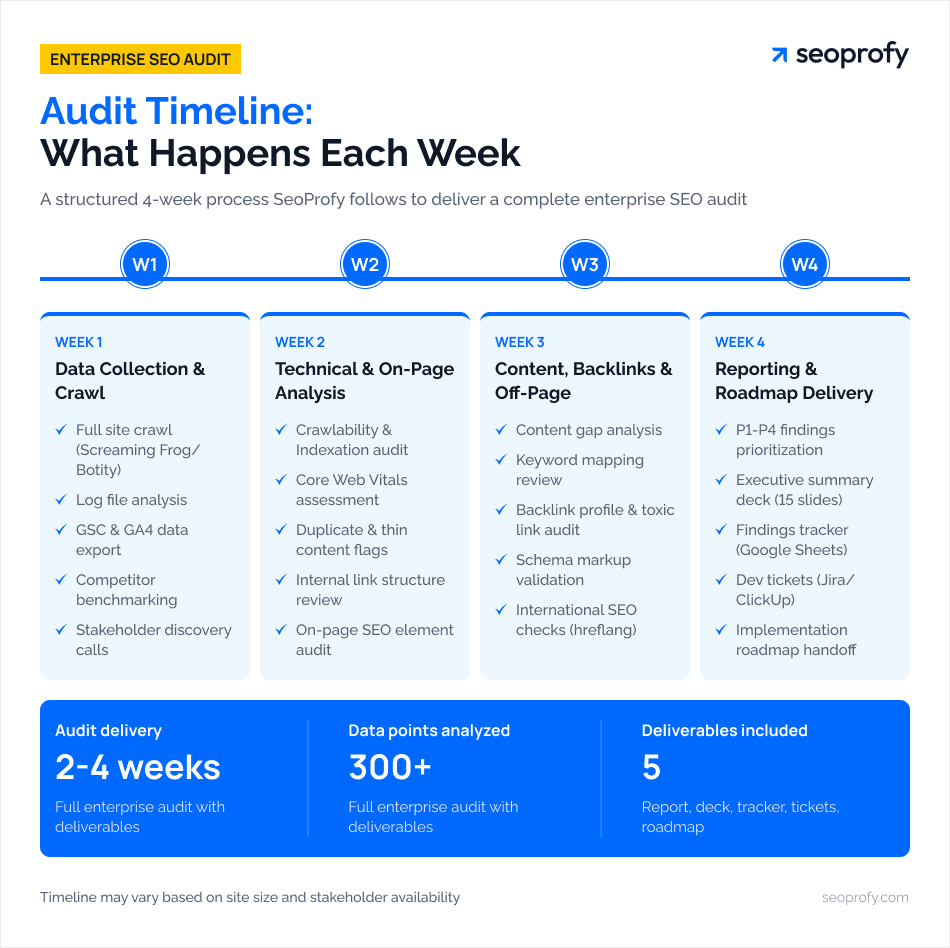
When you work with a reputable agency, you’ll have clear expectations about the audit delivery and exactly what will be covered during it. Given that enterprises typically run large-scale websites, this process takes four to eight weeks.
Technical SEO Audit (Site Architecture & Core Web Vitals)
Technical background plays one of the most important roles in your website’s performance. For example, according to key statistics our team discovered, 88.5% of users leave a site if its loading time is too slow. Moreover, technical issues are among the main reasons why search engine algorithms don’t see your web pages.
A thorough analysis of your site will give you a clear understanding of the problems preventing you from ranking highly on search engine results pages (SERPs). Here, you can check our technical SEO audit checklist that includes all important elements to review:
- Schema markup: A semantic vocabulary of tags added to your site’s HTML to help search engine algorithms understand your content better.
- Robots.txt: A file in a site’s directory that instructs search bots (crawlers) which pages they must crawl or ignore.
- HTTPS Security: HyperText Transfer Protocol Secure uses SSL/TLS encryption to transfer data between your website and the user’s browser.
- Canonical tags: HTML snippets used to solve duplicate content issues by telling search engines which versions of web pages are preferred copies.
- Meta descriptions and headings: Short HTML attributes that summarize your webpage’s content and are displayed in search results.
- URL structure: An organized format of your web address that determines the hierarchy of web pages and how they are categorized within your site.
- Mobile-friendliness: A metric that estimates whether your website design is properly loaded and displayed on smartphones and tablets.
- Hreflang: An HTML attribute that specifies which language or regional version of a webpage to show, considering the user’s location and language preferences.
- Intrusive interstitials: All pop-ups, overlays, and notifications that unexpectedly appear on your web pages.
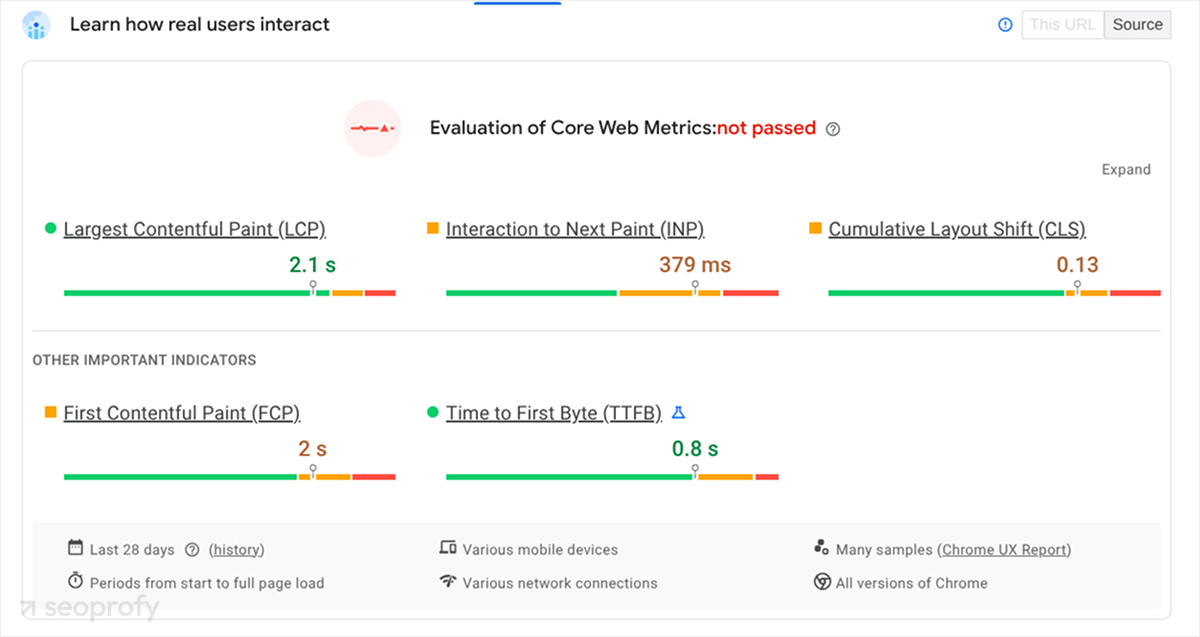
We’d also like to mention Core Web Vitals (CWV) — specific metrics used by Google to assess a website’s user experience in terms of visual stability, loading speed, and interactivity. They are among the most important factors for SEO and include:
- Largest Contentful Paint (LCP): Identifies the rendering speed of the largest piece of content on your website (loading performance).
- Interaction to Next Paint (INP): Shows how long a page takes to respond to user actions.
- Cumulative Layout Shift (CLS): Estimates visual stability of a webpage.
To collect data on the mentioned metrics, it’s essential to crawl the entire domain and all its subdomains. As a rule, SEO experts use specialized software such as Screaming Frog SEO Spider. This tool can identify over 300 technical issues, warn you about website health problems, and suggest ways to improve the user experience.
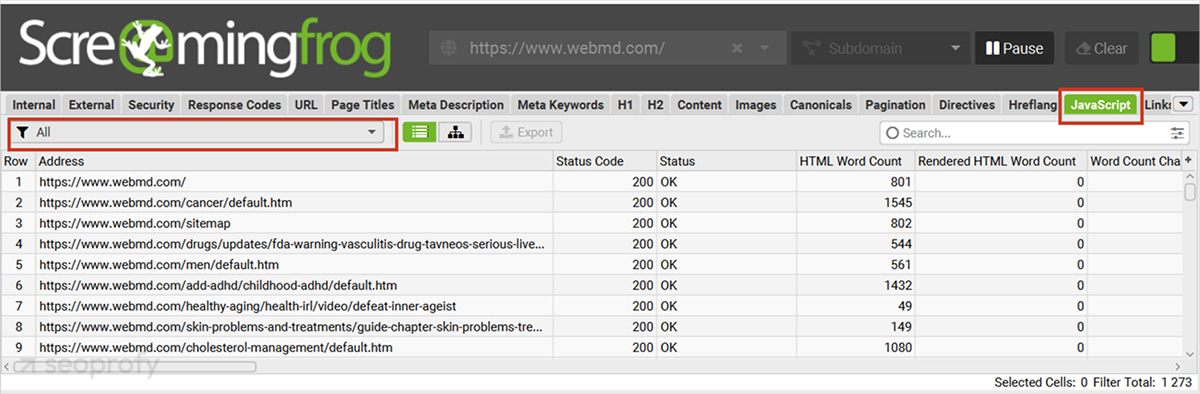
Alternatively, you can opt for PageSpeed Insights — a free tool developed by Google that you can use to estimate your website’s performance across different devices and identify core technical issues. PageSpeed Insights shows page experience signals, including CWV, HTTPS security, intrusive interstitials, and mobile-friendliness.
Note that it’s recommended to use premium versions of software like Screaming Frog for the best results. However, if you aren’t ready to pay for tools that your team won’t need to use every day, it’s a much better idea to rely on technical SEO services. In this case, you’ll get professional assistance without spending your resources on numerous subscriptions or on teaching your team to use new software.
Indexing, Robots, and Crawlability
When conducting a technical audit, it’s crucial to ensure that nothing prevents your web pages from being properly indexed. First, it’s recommended to review the robots.txt file. You can check it by entering yourdomainname.com/robots.txt in a browser. It’ll open a file that includes three main parts:
- User agent: Identifies crawlers that follow the set rules.
- Allow: Tells which pages crawlers should access.
- Disallow: Prevents crawlers from visiting specific parts of your site.
When working with this document, it’s important to identify which pages you want indexed and clarify which bots you want to see on your site. We strongly recommend that you ensure you haven’t blocked Googlebot, Bingbot, OAI-SearchBot, PerplexityBot, Google-Extended, GPTBot, and ClaudeBot. These are the bots used by the most popular search engines and LLMs, so providing them with a possibility to crawl your pages will increase your chances of ranking there or getting cited by AI-powered platforms.
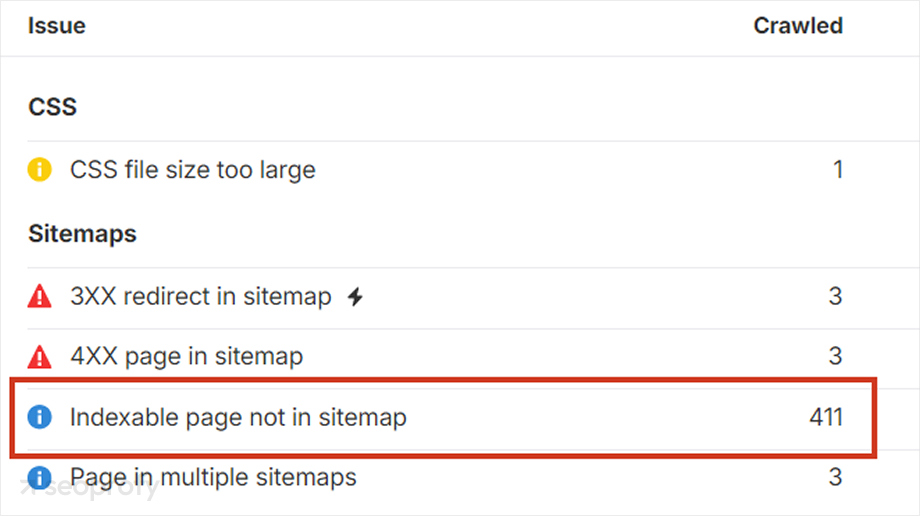
The next step is to ensure that your XML sitemap is clear and useful for search engines. The key actions to take while analyzing it are:
- Ensuring all your listed URLs are active and correct.
- Excluding non-indexable pages (404, redirect pages, and the ones with noindex tags).
- Ensuring that only the canonical page versions are used to avoid confusion (canonicalization).
You can use Screaming Frog SEO Spider or Ahrefs for a comprehensive analysis of your XML sitemap. The tools can crawl your web pages as part of a site crawl, or you can upload specific XML Sitemap URLs you want to check separately.
It’s also a good idea to use Google Search Console to check GSC index coverage (the Indexing report). It’ll show you the indexing status of all your website’s URLs that Google algorithms have visited or attempted to crawl. In the report, you see the pages divided into the following categories:
- Indexed: Valid page, indexed by Google.
- Crawled — currently not indexed: The bots crawled a page, but it hasn’t been added to the index (usually because the content is low quality).
- Discovered — currently not indexed: Google’s algorithms have found the page’s URL but haven’t crawled it yet to save resources.
- Alternate page with a proper canonical tag: Google recognized it as a duplicate.
- Blocked by robots.txt/noindex: Technical restrictions prevent bots from crawling this page.
- Soft 404: The algorithms detect a 404 error, but the page doesn’t return a proper 404 HTTP status code.
During your audit, you must also perform a server log analysis. By examining raw server log files, you’ll get access to the records of every request made to your website. Using this information, you can understand how search engine bots interact with your web pages. For example, you’ll see crawl frequency, HTTP error occurrences, and crawl budget usage. To perform a proper server log analysis, you can use Splunk, Graylog, Semrush, or Screaming Frog Log File Analyser.
Mobile Optimization and Performance
According to our key statistics from various SEO studies, 62.73% of global website traffic comes from smartphones. It means that a person visiting your website is likely using a mobile phone, so you must ensure they have the best possible user experience on their device.
The best way to assess your website’s mobile responsiveness during a technical audit is to use PageSpeed Insights. In the app, you can switch between mobile and desktop versions:
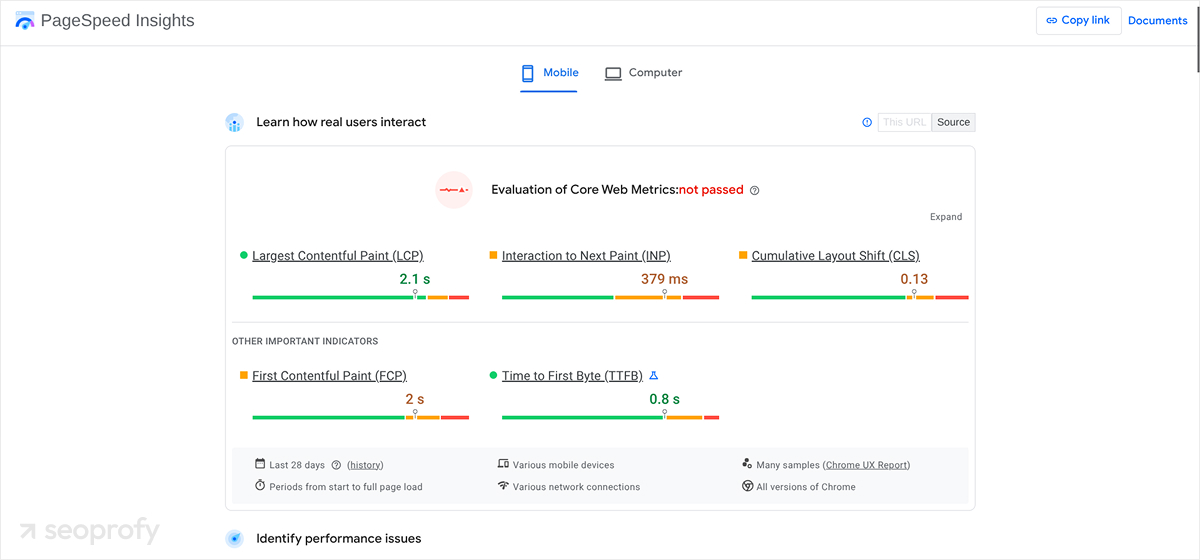
The table below shows the recommended performance metrics for each.
|
Mobile Version |
Desktop Version |
|
| Speed Index | 3,4 seconds or faster | 1.3 seconds or faster |
| CLS | 0.1 or less | 0.1 or less |
| INP | 200 ms or less | 200 ms or less |
| LCP | 2.5 seconds or less | 2.5 seconds or less |
In addition to analyzing performance metrics, it’s reasonable to validate responsive breakpoints. This process involves testing the integrity of the website layout across different screen sizes using emulators, browser tools, and various physical devices.
For example, you can use Chrome or Firefox DevTools to ensure the content on your web pages remains functional, readable, and visually consistent. It’s recommended to check the 320px–1,200px+ range, paying attention to portrait and landscape modes.
Also, you should check touch target sizes — the clickable areas on your web pages for on-screen elements such as icons, links, and buttons. They must be large enough to prevent so-called “fat-finger” errors. The recommended size is at least 44 x 44 CSS pixels. You can check your website’s on-screen elements using Figma plugins or Chrome DevTools.
On-Page SEO: Title Tags, Headings, URLs, Content
For any enterprise, it’s vital to ensure a smooth user journey across thousands, or even millions, of web pages within its main website. At the same time, you should ensure your site includes high-quality content that ranks well in search engines and maintains a steady flow of organic traffic. At this stage of your enterprise SEO audit, it’s important to:
- Ensure your content aligns with your target audience’s search intent: First, conduct a content audit to identify pages that add little or no value. As a rule, they have low traffic, high bounce rates, and automated or scraped text. You can identify these pages by using tools like GSC or Screaming Frog.
- Perform keyword mapping: This process involves assigning relevant keywords to dedicated URLs to ensure each of your web pages targets the appropriate search terms. Keyword mapping organizes terms, prevents cannibalization, and ensures search engines understand which content to rank for specific user queries.
- Create a logical heading structure: All your web pages must use a single, descriptive H1 for the main title. It should be followed by H2s for key sections and H3s for subtopics. Thus, it’ll be easier for users and bots to scan your content.
- Adjust schema markup: This process involves editing the structured data code to fix errors, add missing properties, and update outdated information.
- Conduct keyword research: By analyzing your competitors’ websites and industry trends, you can discover new opportunities to boost your SEO performance. You can discover valuable non-branded keywords with high search volume using premium tools like Ahrefs and Semrush.
- Optimize title tags: Ensure all titles are 50-60 characters and all meta descriptions are 120-160 characters.
On-page SEO directly affects how search engines and users will understand and interact with your content. A proper audit will help you improve search rankings, organic traffic, online visibility, and click-through rates.
Structured Data, Images, and Accessibility
Google offers the Rich Results Test, a free tool for validating structured data markup. You can use it to see whether your web pages qualify for enhanced search features, such as Star ratings, Event carousels, and Recipes. The tool also identifies errors, verifies code compliance, and shows how results appear in Google Search. As part of your enterprise audit, you can use the Rich Results Test to validate schema markup, discover any issues, and fix them later.
Additionally, it’s essential to pay attention to images on your web pages, as they can significantly slow down page load times. At the same time, you shouldn’t sacrifice their quality just to keep them appealing to website visitors. The best idea is to use optimized formats like WebP or compressed JPEG and PNG.
Additionally, you should add alt text to each image. Since search algorithms cannot “see” visuals on your webpage, providing them with descriptions will help them better understand the context, resulting in higher rankings in Google Images.
Finally, check whether all critical elements (e.g., buttons, menus, and dialogs) on your pages have ARIA (Accessible Rich Internet Applications) HTML attributes. They inform algorithms what an element is when ordinary HTML tags cannot. Additionally, ARIA is a crucial tool for creating an accessible and inclusive web experience for users with limited vision.
Internal Linking and Site Navigation
Proper internal linking is important for overall SEO performance and for effective site navigation. It helps you create a logical structure that guides your users from informational content to relevant money pages, where you can sell your products or services. Internal links can reduce bounce rates, increase time on site, and help your target audience find the desired information faster, ensuring a better user experience.
Moreover, search algorithms also prefer a clear internal linking structure. As a result, they can crawl, index, and better understand your website’s hierarchy. When auditing your internal links, pay attention to the following elements:
- Orphan pages: These web pages have no inbound links, so users can’t access them via normal navigation. They significantly affect your SEO by making discovery, context, and prioritization harder for crawlers and wasting crawl budgets. Orphan pages often appear after site migrations or due to poor site structure. You can identify such problematic web pages by using tools like Screaming Frog.
- Anchor text: This is a visible, clickable text that actually connects a hyperlink on one webpage to another. However, it’s not just enough to insert generic phrases like “click here.” All your anchors must be descriptive and relevant to the target page. They should provide context for users and search bots about the topic they will discover by following these links.
One of the best ways to organize your internal links is to follow time-tested best practices. The most popular of them include:
- Hub-and-spoke internal linking structure: A popular SEO strategy for organizing your web pages. It involves creating a central “hub” (pillar page) that covers a broad topic. At the same time, this page should be connected with multiple “spoke” pages (cluster content) that allow users to dive deeper into specific subtopics.
- Deep linking: Naturally, your money pages (e.g., product or service pages) will get less organic traffic. Thus, it’s essential to ensure they’re linked from high-authority pages, such as your homepage and top-level blog posts.
- Excessive link avoidance: Overusing internal links on a single page can appear spammy and affect your overall SEO performance. Although there is no specific recommended count, you should always prioritize relevance and user experience when placing your links.
Backlink Audit and External Authority
Your backlink profile includes all references to your web pages from other online sources. Although growing your backlink profile is good for your authority, you should remember that the quality and relevance of these links are always more important than their quantity. Here is a short checklist on how to ensure your site receives only high-quality references:
- Export referring domains: Use tools like Moz and Ahrefs to discover all online sources linking to your website. Once you get the list, pay attention to Domain Authority (for Moz, recommended: 60+) or Domain Rating (for Ahrefs, recommended: 50+). Additionally, pay attention to other important metrics such as geographical distribution, acquisition rate, and the balance between dofollow and nofollow backlinks.
- Flag toxic backlinks for disavowal: If you spot any broken links or references to penalized sites, remove them immediately. By using tools like Semrush or Ahrefs, you can create a .txt file listing specific URLs or domains. Once you do it, upload it via the Google Disavow Tool. It’ll typically take four to six weeks for Google to process your file and for ranking changes to be reflected.
- Check competitors’ backlink profiles: Both Ahrefs and Semrush let you analyze the online sources linking to your competitors. This allows you to discover new link-building opportunities since there is a strong chance of receiving backlinks from these sites as well.
- Add Domain Authority (DA) data: Your DA depends on the number of high-quality links in your backlink profile. You can get them by reaching other websites and creating valuable, link-worthy content. In-depth blog posts, original research, and data-driven infographics naturally attract links, ensuring steady growth in your DA and backlink profile.
International SEO Checks
Most big companies operate in international markets and have multilingual sites, which require separate attention to hreflang mapping and testing for potential localization errors. During your enterprise analysis, you should check that all language versions have the correct ISO 639-1 (language) and ISO 3166-1 Alpha-2 (region) codes, proper canonical tags, and proper bidirectional return links.
It’s also important to ensure the backlinks from third-party sources refer to your website’s content written in the same language. For example, a person who enters your site by clicking a hyperlink on an English-speaking site will be directed to an English-speaking version of your domain.
Analytics, Organic Traffic, and Google Analytics
Considering that search engine optimization isn’t a sprint but an everlasting marathon, you should also learn how to track SEO results of your enterprise site. During your audit, it’ll be reasonable to adjust and automate your monitoring system to receive timely reports. Here is the audit checklist of the most important steps to take:
- Connect your Google Analytics (GA4) to audit reporting. This process involves checking tag firing in Google Tag Manager, setting up internal IP filters, enabling data retention, and configuring Looker Studio.
- Analyze organic traffic trends. You can export organic traffic data from your GA4 in the Traffic Acquisition section and download it as a CSV, Excel, or Google Sheets document. This data is useful since it shows where your users originate and which pages they visit first.
- Link Google Search Console (GSC) with your GA4. Finally, if you want to see search queries, impressions, and CTR directly within your GA4 reports, you must connect to GSC. First, ensure that you have Editor access to your GA4 and are a Verified Owner of the website in GSC. Afterward, link these two tools with the GA4 Admin panel (Search Console Links section).
SEO Audit Reporting and Prioritization
After completing your SEO analysis, it’s essential to compile all the issues you’ve identified and prioritize them for fixing. We offer you the option to opt for an efficient P1–P4 priority framework:
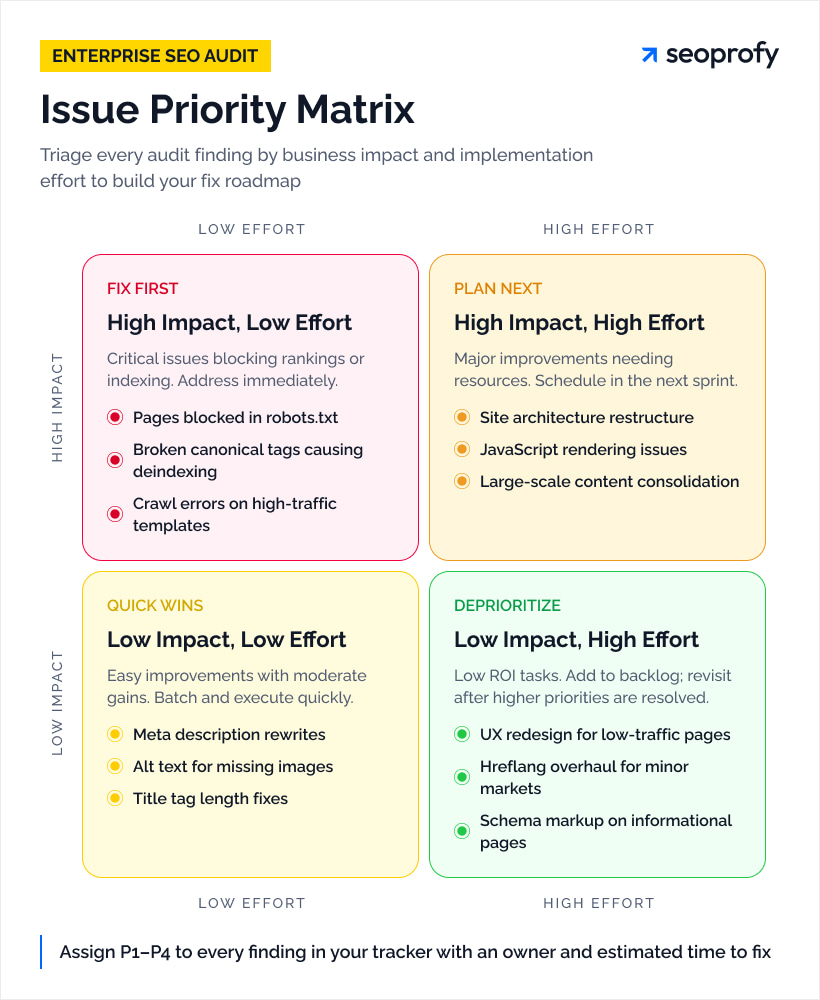
- Priority 1 (P1): critical or urgent impact
- Priority 2 (P2): significant impact
- Priority 3 (P3): moderate or low impact
- Priority 4 (P4): negligible impact.
In your reports, you must fix P1 issues first. In addition, it’s a good idea to estimate the resources required to resolve these issues and assign the responsible experts. Ideally, your table with prioritized tasks should look like this:
|
Issue |
Category |
Effort |
Priority |
Responsible |
Estimated Time |
| Important pages are blocked in robots.txt | Technical SEO, crawlability | Low | P1 | SEO team | 2–3 hours |
| Orphan pages detected | On-page SEO, internal linking | Medium | P2 | SEO and Content teams | 1–2 days |
| Thin content | On-page SEO, content | High | P3 | Content team | 2–3 weeks |
Build an SEO Strategy from Audit Findings
The data you discover will help you develop a well-planned SEO strategy that ensures steady growth in your rankings across organic search results and AI platforms. It’s recommended to focus on fixing the discovered technical issues first.
Afterward, you can focus on optimizing your on-page content based on keyword gaps. Finally, don’t forget to highlight link-building priorities in your enterprise SEO strategy. It’s also a good idea to keep an eye on the emerging enterprise SEO trends and implement them before your competitors do. Thus, you increase your chances of reaching top positions in SERPs first and getting more organic traffic.
Although there are different planning techniques, we strongly recommend assigning quarterly OKRs (Objectives and Key Results). This process involves setting qualitative goals supported by measurable outcomes that align with your key SEO goals, such as increased qualified leads and revenue. It’ll be a good idea to limit it to five objectives per quarter, with two to four key results per objective.
Deliverables, Tools, and Templates
Performing an SEO analysis at the enterprise level requires working with a ton of information. To ensure you don’t miss anything important, we’ve prepared a table of the deliverables you can expect to receive after your audit.
|
Deliverable |
Description |
Example |
| Findings tracker | Well-structured report with all audit issues and their priorities | A Google Sheets document with tabs for all discovered technical, on-page, and content issues |
| Executive summary | Overview of key findings, risks, and opportunities for enterprise stakeholders | A presentation with up to 15 slides |
| Technical SEO report | A report reviewing the website’s technical condition (CWV, indication, and crawlability) | A Google Sheets document with a clear description of all discovered technical issues and recommendations to solve them |
| Developer tickets | Actionable tasks for the development team | Jira/ClickUp tickets with clear instructions |
| Implementation roadmap | A plan divided into phases for executing the set tasks | A document with a description of Phase 1 (critical fixes), Phase 2 (further improvements), and Phase 3 (growth) |
Also, consider which tools you’ll use during and after your enterprise audit. If you haven’t decided yet, you’re welcome to check our list of recommended software:
- Google Sheets and Google Slides
- Google Search Console and Google Analytics
- Semrush or Ahrefs
- Screaming Frog
- PageSpeed Insights.
Stakeholders, Roles, and Governance
Finally, let’s briefly define who will take part in your enterprise SEO audit. Below, we’ve prepared the list of the most important roles in this process:
- Stakeholders: Define business goals, approve priorities and budget, and evaluate overall SEO impact.
- SEO team: Identify issues, conduct an audit, and monitor performance.
- Content team: Use SEO recommendations to optimize and create content.
- Development team: Implement technical fixes.
As you can see, analyzing an enterprise website and making further improvements involves many people. If you want to keep everything under control and prevent chaos, it’s essential to schedule weekly and monthly checkpoints. During them, you can review progress, validate fixes, and reprioritize tasks.
Next Steps and Continuous Audit Process
Even after a successful audit and development of your strategy, you will still need to perform quarterly mini-audits to check your site’s technical background, on-page SEO elements, and backlink profile. Note that algorithms change, and even the slightest Google update may require you to take action to avoid drops in traffic and indexing.
We strongly recommend enabling automated alerts to detect potential problems in advance. Also, you’re welcome to opt for our enterprise SEO services if you want to ensure nothing will affect your online rankings. With our advanced proprietary software and outstanding experts, you can completely outsource monitoring your website’s health and focus on other business tasks.

Bohdan has been an SEO analyst at SeoProfy for more than two years. He began his career in digital marketing in 2019 and has since gained experience helping scale some of the world’s leading brands in industries such as gambling and SaaS. Bohdan specializes in developing effective strategies tailored to specific regions.