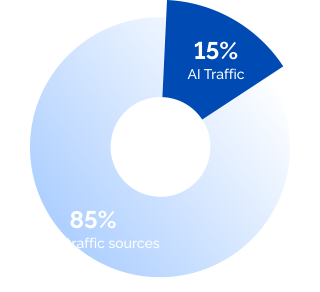


Duplicate content in SEO is one of those issues that can easily sneak up on you. You don’t even have to intentionally copy someone’s content. Through CMS configurations, session IDs, URL parameters, or basic domain variations, the same content can end up at multiple URLs. And search engines can’t figure out which one to prioritize.


This affects your SEO performance in multiple ways, even if Google doesn’t hand out penalties for duplicate content automatically. It leads to wasted crawl budget, diluted link equity, and ranking signals working against each other.
In this guide we cover what duplicate content is, how exactly it can impact your SEO efforts, how to detect it, and how to resolve the issue.
- Duplicate content occurs when identical or near-identical content appears across multiple URLs — on the same site or across different websites.
- Search engines have limited crawl budgets, and duplicate pages burn through that budget without adding any value.
- Duplicate content doesn’t typically result in Google penalties unless it’s clearly created to deceive users or manipulate search rankings.
- Common causes include domain variations, session IDs, URL parameters, and multiple taxonomy paths to the same content.
- The most reliable fixes are 301 redirects, canonical tags (rel canonical), noindex tags, and proper URL parameter handling.
What Is Duplicate Content?
Duplicate content refers to situations where you find the same or similar text on different web addresses, whether that’s on the same website or across various sites.
Here are the most common examples:
- The exact same content that can be reached through different web addresses
- Identical product descriptions on your store and on manufacturer or competitor sites
- Syndicated content — the same article published across multiple websites, even with the original publisher’s permission.
Duplicate content is one of the most common SEO issues, especially for large websites like online stores, and it can affect your search visibility. Here’s Google’s position regarding duplicates:

The Impact of Duplicate Content on SEO
As a website owner or an SEO specialist, you might create duplicates without realizing it and then wonder why SEO doesn’t work. Let’s look at why duplicate content is a real problem and how exactly it can hurt your search rankings.
Why Is Duplicate Content an Issue?
Overall, it’s all because of how search engines work. They aim to display the most relevant results, so when their algorithms discover multiple URLs with the same text, they face a dilemma: Which one should they show in search results?
Several types of duplicate text can drag down your search engine rankings: internal and external.
- Internal duplicate content occurs when the same content appears in different locations of your own site. Those duplicate pages end up competing for the same audience — you get several weaker pages all trying to steal traffic from each other.
- External content duplication in SEO occurs when other websites feature your content.
How Can Duplicate Content Hurt SEO?
Duplicated pages can lead to many issues. Often, the most critical are indexing challenges, when Google indexes a less preferred version of the page or splits rankings between two similar pages.
However, user engagement metrics can also suffer — users may bounce because they encounter the same information repeatedly. This signals to Google that the specific copy doesn’t satisfy the user’s search intent and, thus, doesn’t deserve a high position.
Similar pages also cause decreased crawl budget and diluted link equity. Crawl budget is the amount of time Google spends crawling your website in a given period. When a site has a lot of duplicate content, that time gets wasted on repetitive pages. The result:
- Search engines spend time on duplicate pages instead of discovering your unique content.
- They may leave your site without seeing all your important pages.
- Algorithms can get confused about which version of similar pages actually deserves their attention.
An often overlooked aspect of SEO hurt by duplicate content is link building. Here’s how your backlink profile might be impacted:
- Divided link power: If the same text appears on different pages, some sites might link to one version while others might choose another. Instead of strengthening one page, link equity gets split across several identical pages.
- Mixed signals for Google: The anchor text in backlinks lets search engines understand what your page is about. When those signals point to multiple versions of the same content, Google has a harder time determining which is the right one to rank.
- Misleading link analytics: When links are scattered across duplicate pages, getting an accurate picture of your backlink profile is difficult. Your actual link equity is harder to measure and act on.
Lastly, a factor that is gaining more importance in 2026 — AI visibility — can also suffer from duplication. AI search tools, including Google’s AI Overviews, popular LLMs, and AI search engines, pull from indexed pages to generate their answers. If duplicate content prevents them from identifying a clear authoritative source, your content is less likely to surface in those AI-generated results. Keeping your content consolidation clean is critical for consistent LLM search visibility, citations, and mentions.
Can Duplicate Content Cause a Penalty?
Now, the most important question for most website owners: Does Google penalize duplicate content? No — the idea that it’s a direct ranking penalty is one of the SEO misconceptions. Google just wants to filter out similar content and display the version it thinks will be most helpful for users.
So, if you notice that your pages aren’t showing up on Google, it’s not necessarily because of duplication. Real penalties usually come into play only when there’s clear manipulation involved.
If you’ve experienced the “wrath of Google,” you need to determine the real issue behind it, which will mostly be something else. You might need to seek Google penalty recovery services or try to recover yourself. SeoProfy can assist you in such a task. Take a look at our latest SEO case to see how we can get your rankings back on track.
What If Someone Scraps Your Content?
Finding your content on someone else’s site is frustrating, especially when you’ve invested real money into producing quality content. Google typically tries to determine the original piece and rank it higher in search results. However, in rare cases, you may find that the copy holds higher positions. Here’s what you can do about it:
- Check the robots.txt file, as it might be unintentionally blocking Google from crawling some pages.
- Review your sitemap to make sure it includes the content that was copied.
- Double-check your site against search quality guidelines, as even minor technical issues can hurt your page rankings.
If someone steals your content, you can also file a request to remove the page through Google’s Legal Troubleshooter. What if ranking problems persist? Professional assistance might be the most effective way to resolve them.
Whether you suspect a duplicate content issue, have trouble recovering after a Google penalty, or just want to achieve better SEO results, the SeoProfy team is here to help you.
- Rank higher in search results
- Attract more traffic
- Get more conversions

Common Causes of Accidental Duplicate Content
Unintentional duplication is common enough that you need to actively watch for it — left unchecked, it can lead to a Google ranking drop. Here are the main problems that can lead to identical web pages.
Domain and Protocol Variations
When it comes to web addresses, having variations can cause duplicate content issues since the same page can be reached through different URLs. You might find identical content under any of these four links:
- https://example.com/page
- https://www.example.com/page
- http://example.com/page
- http://www.example.com/page
Search engines see these as separate pages, even though the text is exactly the same.
URL Formatting Differences
The way URLs are structured can also lead to duplicate content if web servers treat them as separate pages. Here are two common issues:
- Case sensitivity: Some servers might see “https://example.com/Product-Page” and “https://example.com/product-page” as distinct URLs.
- Trailing slashes: Both “https://example.com/category” and “https://example.com/category/” can display the same content.
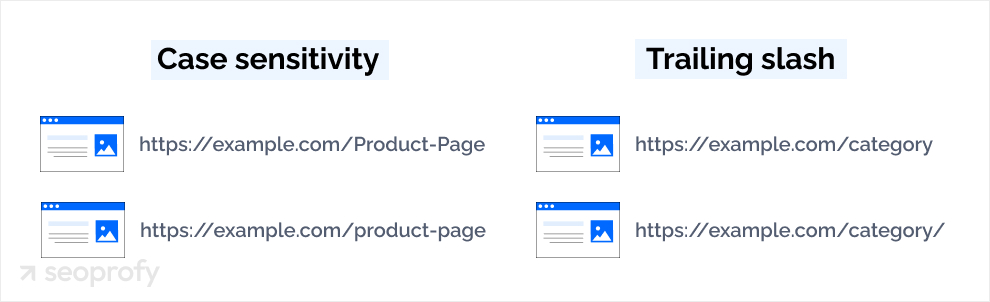
These small differences confuse search engines because they look like separate pages that happen to share the same text.
Homepage Variations
Index pages can inadvertently create duplicates when they’re accessible via different URLs. For example:
- example.com/
- example.com/index.html
- example.com/index.php
All of these usually display your homepage, but to search engines, they can look like entirely separate pages.
Filter and Sort Parameters
On ecommerce sites, URL parameters are often used for filtering and sorting products, which can lead to multiple URLs showing similar content:
- example.com/products?color=blue
- example.com/products?size=large
- example.com/products?color=blue&size=large
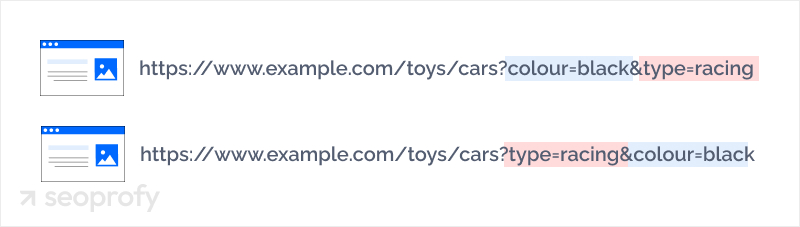
Even though these URLs might contain slightly different text, search engines often view them as duplicate versions of the main product page. Without proper parameter handling, search engines end up focusing their crawl budget on these variations rather than your original content.
Taxonomies
Content management systems sometimes create multiple paths to reach the same content. For example, blog posts, articles, or products can show up under:
- Category pages (example.com/category/subcategory/post)
- Tag pages (example.com/tag/topic/post)
- Date archives (example.com/2023/04/post)
- Author pages (example.com/author/name/post)
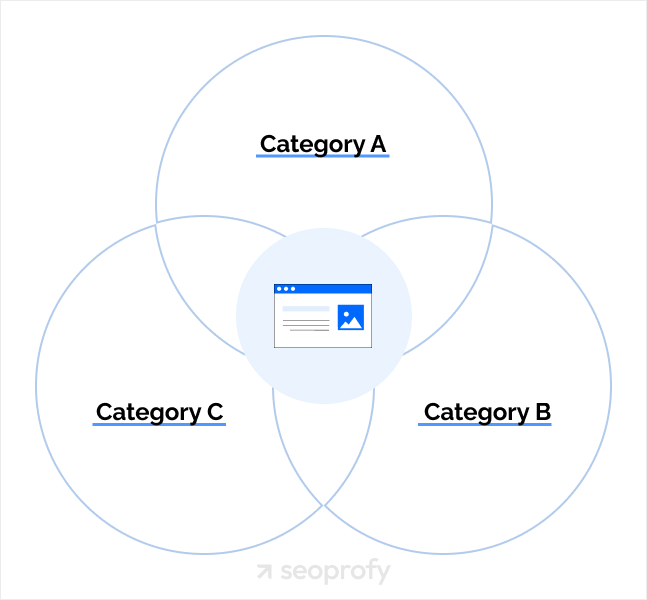
Each of these paths creates a unique URL pointing to identical content.
Session IDs
Some servers assign unique session IDs to URLs to track individual user sessions. Each visitor effectively gets a unique URL:
- example.com/product?sessionid=12345
- example.com/product?sessionid=67890
To search engines, each of these looks like a separate page with identical content. Session IDs are a common technical SEO issue, especially on older ecommerce platforms, and they can generate hundreds of duplicate URLs without anyone noticing.
Boilerplate Repetition
When a website reuses large blocks of identical text across many pages — such as generic category descriptions, repeated term snippets, or standard introductory copy — search engines may treat those pages as duplicate content. This boilerplate repetition is especially common on CMS-driven sites where the same intro text gets auto-populated across dozens of category or tag pages.
How to Identify Duplicate Content on Your Site
Without preventive measures in place, duplication can happen on its own, as described above. The good news is that you can spot most duplicate content issues with the right tools and a bit of time.
A great place to start is by doing a simple search on Google. Just type in “site:yourdomain.com” and then add a specific phrase from the copy you think might be duplicated. If you see several pages in the results with the same content, you’ve confirmed a duplication problem.
There are some handy SEO tools that can help you find duplicate content even faster:
- Copyscape and other plagiarism checkers compare your site against billions of pages to let you know if your text is appearing anywhere else on the web.
- Ahrefs offers a Site Audit tool that scans websites for SEO problems, and duplicate content is among the issues it detects, including in page body, title tags, and headings. The Site Audit tool on Semrush serves a similar purpose.
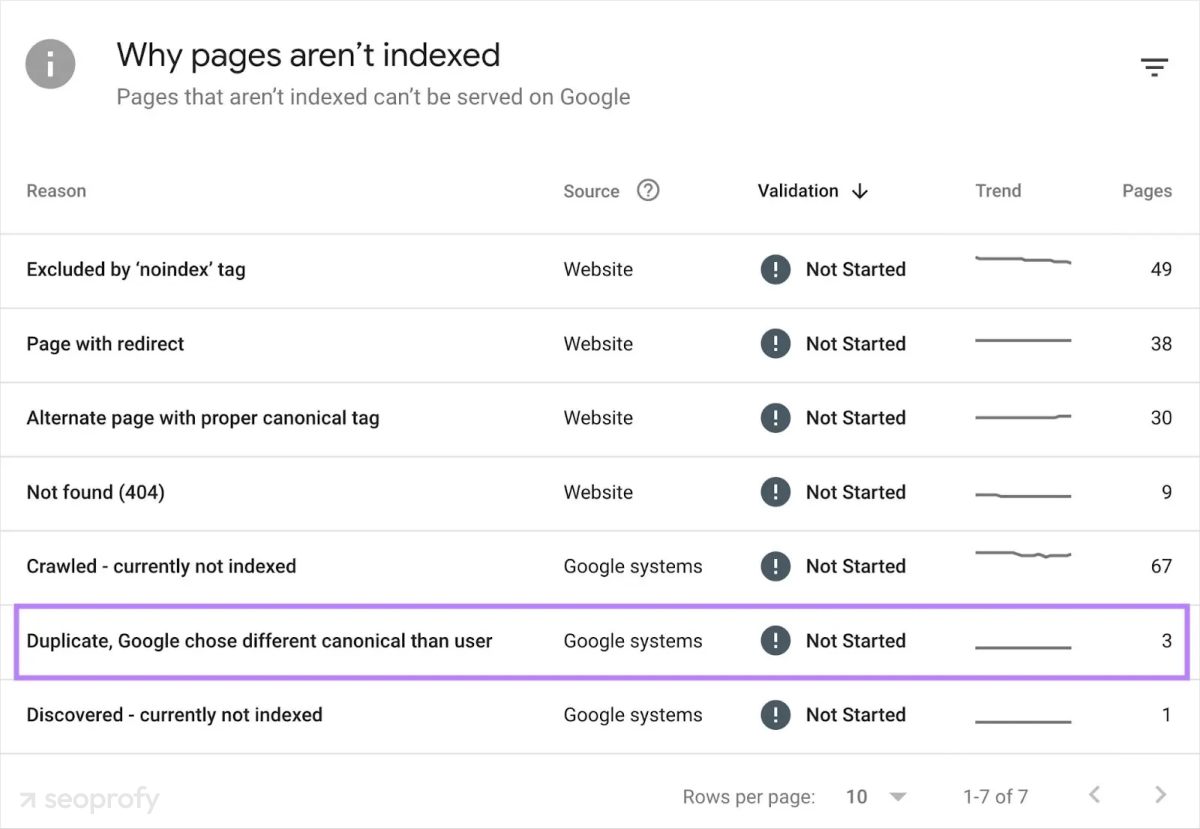
- Google Search Console can indicate identical metadata, like duplicate titles and descriptions, and its Page Indexing report can hint at duplicate issues when explaining reasons for indexing problems.
- Screaming Frog SEO Spider can crawl your site and identify pages with identical or very similar content.

How to Fix Duplicate Content Issues
The causes of duplicate pages can vary quite a bit, which means the solutions will depend on the specifics of the problem. If you’ve noticed a sudden drop in website traffic due to duplicated content, here are the most common solutions.
Make Sure Your Site Redirects Correctly
One of the simplest methods is to make sure your website uses only one version of your domain. Pick either www or non-www and choose between HTTP or HTTPS (we recommend HTTPS for better security). You can also configure your server to redirect all the other versions to your chosen one automatically.
Set URL Parameters
If you run an ecommerce site or any other site that uses URL parameters (the question marks and equal signs you see in links), you can control how search engines handle them with the help of canonicalization and robots.txt. This way, Google will understand when parameters are just duplicating pages and when they’re creating unique content worth indexing.
Implement 301 Redirects
A 301 redirect is often the best solution when you’ve identified duplicate pages. This redirect sends both users and search engines from the duplicate page to the original. Plus, it carries most of the ranking power over to your preferred page, which strengthens your SEO efforts. If you’re restructuring URLs or running a site migration, our guide on how to migrate a website without losing SEO covers the full redirect process.
Apply the Canonical Tag
Duplicates might be inevitable in some cases, such as in product variations. Search engines can understand these variations if you use proper tags to indicate the main page. The canonical tag — written as rel canonical in your page’s HTML head — tells the algorithms which version of a page is the primary one. It passes link equity to the canonical URL and consolidates ranking signals without requiring you to delete or redirect pages.
For example, if a product page is accessible at both example.com/products/item and example.com/products/item?color=blue, you’d add a canonical tag pointing back to the original URL. You can also use self-referencing canonical tags on your main pages as a precaution — these signal your preferred canonical URL to search engines even when no duplicate versions currently exist.
Use Noindex Tag
The noindex tag tells search engines not to include a specific page in search results. This prevents duplicates from competing with your original content while still allowing users to access the page through direct links. For instance, the noindex tag is widely used in shopping cart best practices to prevent search engines from indexing checkout pages.
How to Prevent and Monitor Duplicate Content
Preventing duplication is a lot easier than fixing it later. Here’s how you can avoid duplicate content:
- Plan your site’s structure carefully, thinking about how content will be organized across categories, tags, and archive pages. A clear structure can lower the chance of creating multiple paths to the same content.
- When you add new features to your website, always test if they might cause duplicate content. For example, if you launch a new product filter (such as color, size, or price), make sure it doesn’t generate new URLs for the same items.
- If you run an ecommerce site, invest some time in creating unique product descriptions. Reusing manufacturer descriptions is one of the most common causes of external duplicate content. Prioritize original content creation in your ecommerce content marketing strategy, along with proper URL configuration.
In addition, we recommend establishing a regular monitoring routine to detect any new duplication problems:
- Schedule quarterly content audits, paying special attention to potential duplication.
- Use tools like Screaming Frog, Ahrefs, and Semrush to spot duplicate content automatically.
- Regularly generate Google Search Console’s Page Indexing reports that might indicate duplication issues.
- Consider using plugins or extensions that flag potential duplicate content when you’re publishing new material.
Conclusion
SEO isn’t just about optimizing content with keywords. It also implies a significant amount of technical work behind the scenes to ensure search engines can understand, crawl, and index your site. Start with a thorough audit to identify duplicate content issues across your site, and focus first on your highest-value pages — the ones driving revenue or traffic.
Our professional SEO team can assist you with this task. We use advanced tools to conduct site audits, pinpointing exactly where duplication occurs and developing customized solutions for each of our clients.
Get in touch with us for a free initial consultation and find out more about how SeoProfy can help you rank higher and turn more visitors into customers!

Andrew Shum is the Head of SEO at SeoProfy with 10+ years of experience in SEO and digital marketing. He has been part of the company for over 6 years and has led the SEO department for the past 3.5 years, managing a team of 15+ specialists. He works with competitive and international multi-language projects across eCommerce, SaaS, and enterprise niches, focusing on practical SEO strategies that deliver measurable results.