


An ecommerce SEO audit is a comprehensive review of an online store website’s technical setup, structure, content, and authority. It reveals issues of crawlability, accessibility, ranking, and user engagement that affect your store’s overall performance and business revenue.


Low site speed, inaccessible pages, or ranking drops all determine whether a visitor buys from you or from a competitor. That is why you need a regular SEO audit of your website’s performance if you run an ecommerce business.
In this article, we’ll guide you through the audit process. And once you’re ready to act on your findings, check out our SEO guide for ecommerce to get practical recommendations.
- An ecommerce SEO audit should be aligned with business goals and revenue models.
- Crawl budget and index bloat are major issues that prevent important pages from indexing.
- Product and category pages should clearly match commercial search intent to rank and convert.
- Internal linking and site architecture determine how ranking power reaches high-value pages.
Audit Scope & Business Alignment
Before you start an SEO checkup, you should decide what you are testing and why. Without this, even a structured SEO audit can turn into chaos, indicating multiple issues to fix but not giving any strategic clarity needed to improve your bottom line.
Defining Business Goals Before Running the Audit
An ecommerce SEO audit shouldn’t just highlight a list of errors; it should provide a revenue-boosting roadmap. Thus, it needs to be tailored to your business goals:
- Identify priority categories: Focus on categories that have the highest search demand and profit. Prepare a list of category or product pages that matter most for your business. This list will guide every subsequent step of the ecommerce site SEO audit, ensuring technical fixes happen on money pages first.
- Analyze margin structure: Prioritize categories and products that offer the highest ROI rather than high traffic.
- Define service areas: Check your performance in a specific region or a national market. This prevents spending resources on rankings in geographic locations where you cannot ship or provide services.
The success of an ecommerce website is not just about traffic growth but also about getting more leads and driving revenue. Understanding your business context will help you shape your ecommerce SEO audit and focus on the things that matter most for your store.
Mapping SEO KPIs to Commercial Metrics
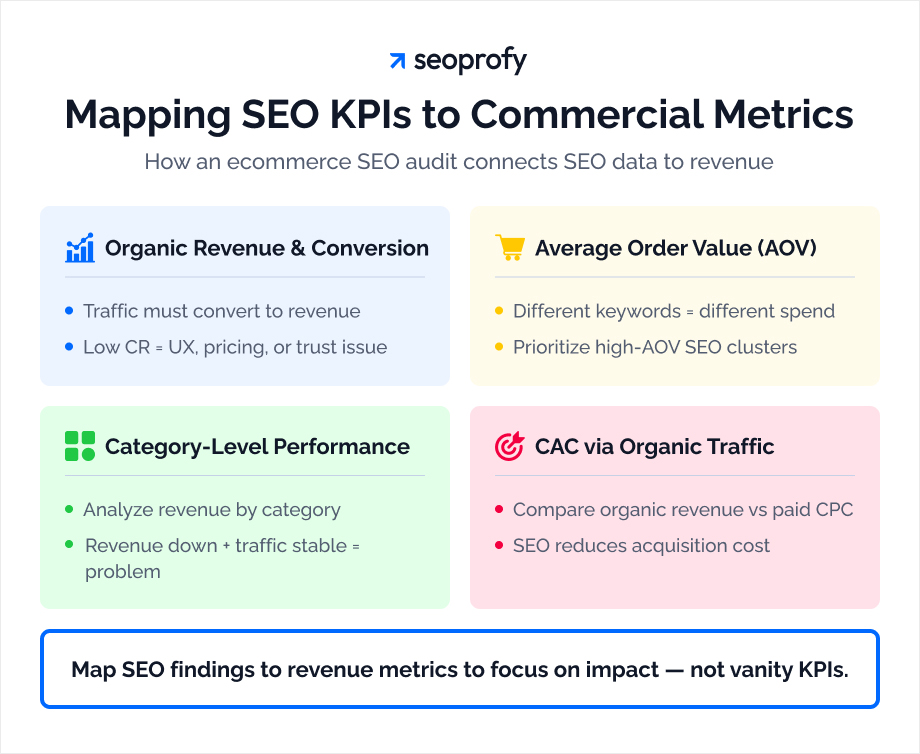
Finally, you need to bridge the gap between SEO data and business needs. This stage of the ecommerce SEO audit shows how search performance impacts your actual bank account. Its goal is to map your findings to these four commercial pillars:
- Organic revenue and conversion rate: Ranking is useless if the page doesn’t convert. Check your top-ranking pages in Google Analytics 4 to track the actual organic revenue earned by your top-ranking pages. If a page has 10,000 visitors but a 0.1% conversion rate, the “fix” isn’t more traffic but improving the user experience, pricing, or trust signals.
- Average order value: You might find that clients coming from certain keywords spend $200 per order, while those from “discount” or “sale” target keywords spend only $20. Knowing which SEO clusters have a higher AOV, you can focus on the most profitable positions in your catalog.
- Category-level performance: Check how an entire product category performs instead of every individual query. This indicates revenue leaks. If the revenue of a certain category is down 30% but the traffic has not changed, you might discover technical issues or a new competitor who is aggressive on pricing.
- Customer acquisition cost (CAC) via organic traffic: An effective SEO strategy protects against rising ad spending. Calculate how much revenue is generated by organic traffic compared to the costs you would pay for the same number of ad clicks.
Mapping your audit findings this way ensures that you focus on the right metrics for your business.
Crawlability & Indexation Control at Scale
The simplest rule in SEO is that if a page isn’t indexed, it doesn’t exist to searchers and potential customers. Even if it perfectly matches the buyers’ needs, it won’t generate revenue until search engines can find it. Ecommerce websites often struggle with thousands of pages that are difficult to monitor. Crawl budget, technical indexing errors, and “index bloat” are top issues to consider.
Crawl Budget Allocation for Ecommerce Websites
Google doesn’t have unlimited time for your ecommerce site. If a search engine bot spends time on low-value pages, your top-performing products may be overlooked. To avoid this, you should eliminate common crawlability issues:
- Filter and facet overload: Numerous combinations of filters generate near-identical URLs that waste crawl budget.
- Pagination issues: Poor navigation keeps Google on old inventory pages, which prevents the indexing of new products.
- Technical noise: Session IDs and tracking codes create “ghost” duplicates that Google crawls instead of your real products.
Use this ecommerce SEO audit checklist to ensure Google can find your “money” pages and isn’t wasting time on technical noise:
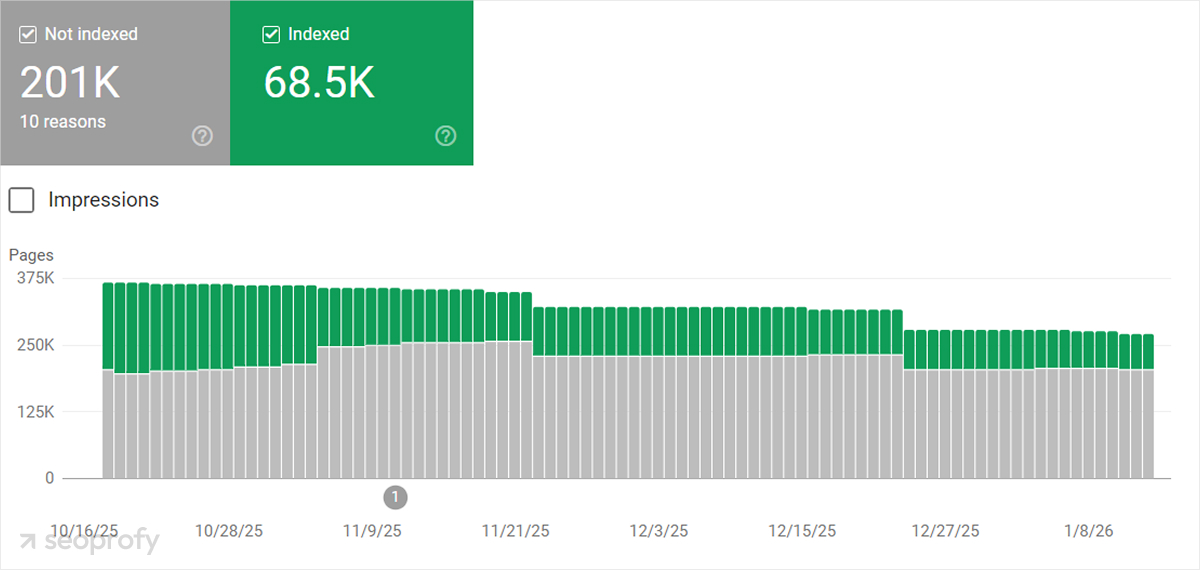
- Check page indexing: Go to Google Search Console and use the Page Indexing report to verify these pages are indexed and searchable.
- Identify blockers: Ensure your robots.txt file does not hide important pages from search engines.
- Fix broken paths: Repair broken links that stop Google from reaching your products.
- Update XML sitemaps: Confirm your sitemap only lists current, high-value pages.
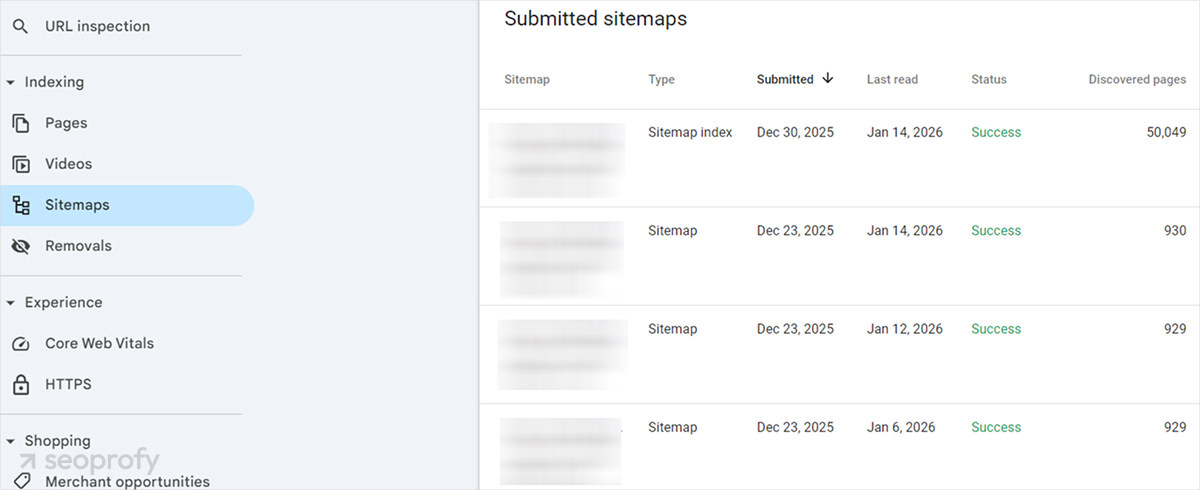
- Check the waste ratio: Compare total site URLs to your actual product count. If URLs outnumber products, the crawl budget is wasted on technical noise.
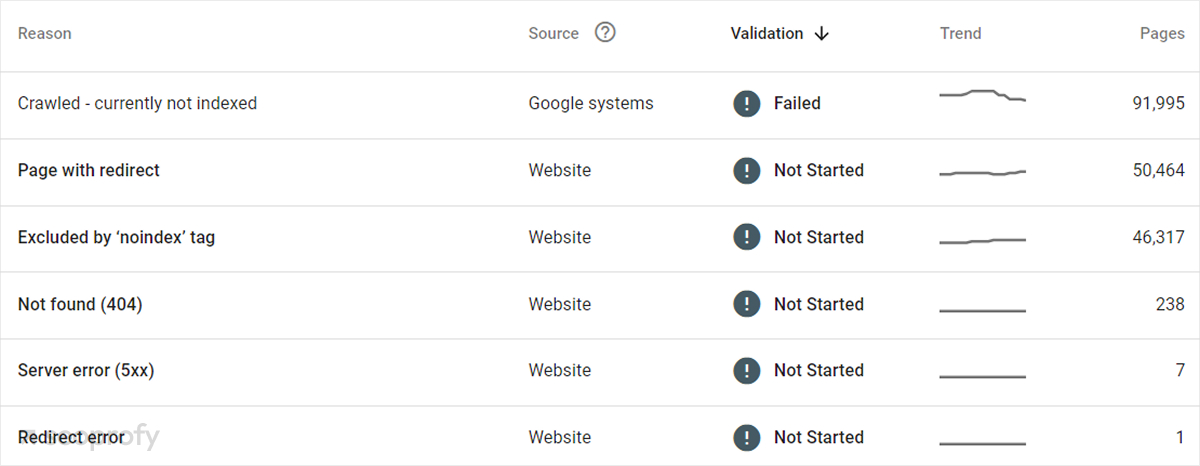
- Monitor crawl stats: Review the “Crawled — currently not indexed” report in GSC to find low-quality or repetitive pages that Google is ignoring.
Indexation Signals and Index Bloat Detection
Once you’ve made it easy for Google to find your ecommerce site pages, you have to decide which of them actually deserve to show up in search results. This is critical to avoid index bloat, which happens when thousands of low-quality or redundant pages clutter Google’s index.
To keep your store visible in search, you need to check the gap between what is “indexable” (pages that can be found) and what is actually “indexed” (pages Google has chosen to show). Your store likely has index bloat if the ecommerce SEO audit reveals:
- Thin content pages
- Duplicate or redundant pages
- Outdated URLs.
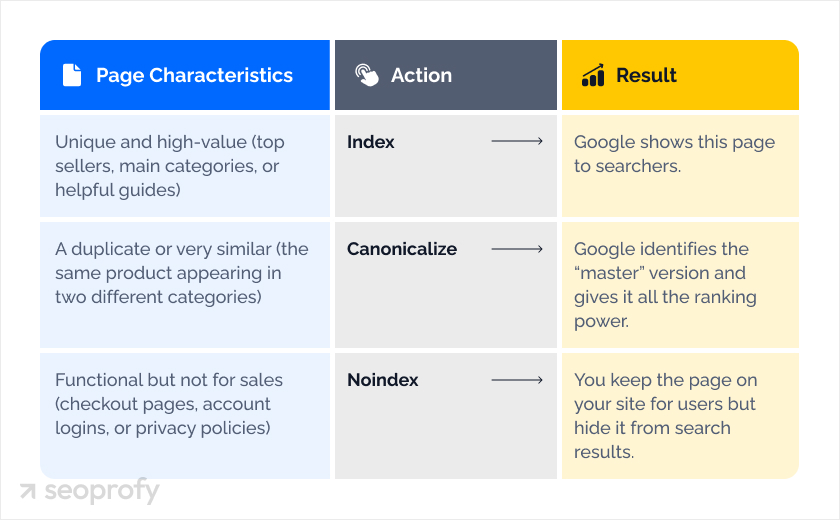
To decide which pages should be visible to customers in search results, use the following decision framework:
| Page Characteristics | Action | Result |
| Unique and high-value (top sellers, main categories, or helpful guides) | Index | → Google shows this page to searchers. |
| A duplicate or very similar (the same product appearing in two different categories) | Canonicalize | → Google identifies the “master” version and gives it all the ranking power. |
| Functional but not for sales (checkout pages, account logins, or privacy policies) | Noindex | → You keep the page on your site for users but hide it from search results. |
Using this SEO audit framework, you ensure that search engines notice and show the pages that actually make sales.
Ecommerce Site Architecture & URL Structure
An excessively deep structure or messy URLs can make search engines unable to decide which pages to prioritize. For the same reason, customers will have a hard time navigating the website and will likely leave before reaching the checkout. That’s why site architecture and URLs should be on your ecommerce SEO audit checklist.
Category Depth and Logical Hierarchy
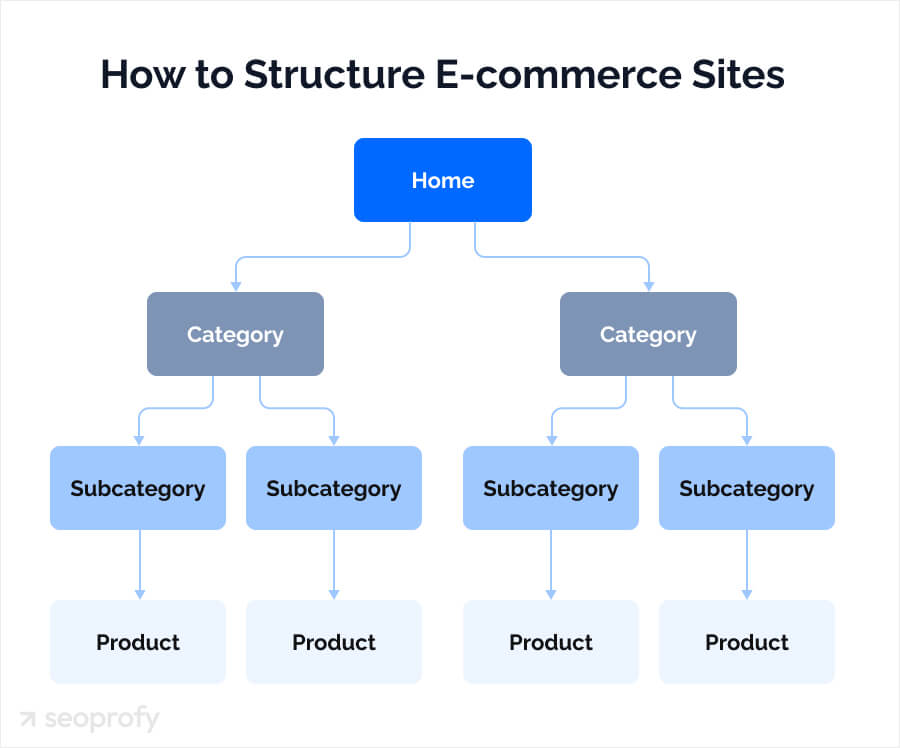
One of the main goals of technical SEO is to create an ecommerce site structure that keeps your products as close to the homepage as possible. The architecture also determines how link equity (the “ranking power”) flows from your main page to individual products.
When the site structure is too deep, important pages can end up at the end of a long chain. This creates three major problems:
- Weakened rankings
- Poor crawlability
- User frustration.
For a scalable ecommerce site, you may follow one of the industry standards — the “three-click rule”: a user and search engines should be able to reach any product within three clicks of the homepage.
When reviewing your hierarchy during an SEO audit, ask yourself these questions:
- Is the path logical? Does it follow a clear Parent > Child relationship (e.g., Home > Apparel > Men’s Shoes > Running)?
- Can we simplify it? Can some subcategories be merged to reduce the number of clicks?
- Are we using “Mega Menus”? High-volume ecommerce sites use large navigation menus to link directly to top-tier subcategories from the homepage.
Faceted Navigation and Parameterized URLs
Faceted navigation is a system for sorting items by size, color, brand, or price. It is essential for the user experience, but it poses technical hurdles for search engines. When a user clicks a filter, your ecommerce website typically generates a unique web address. For example, selecting “Red” for color options and “Large” for sizes might create a URL like “store.com/shoes?color=red&size=large.”
If your system allows Google to follow every possible combination of these filters, it leads to wasted crawl budget, index bloat, and diluted ranking power. See how interconnected different aspects of SEO are?
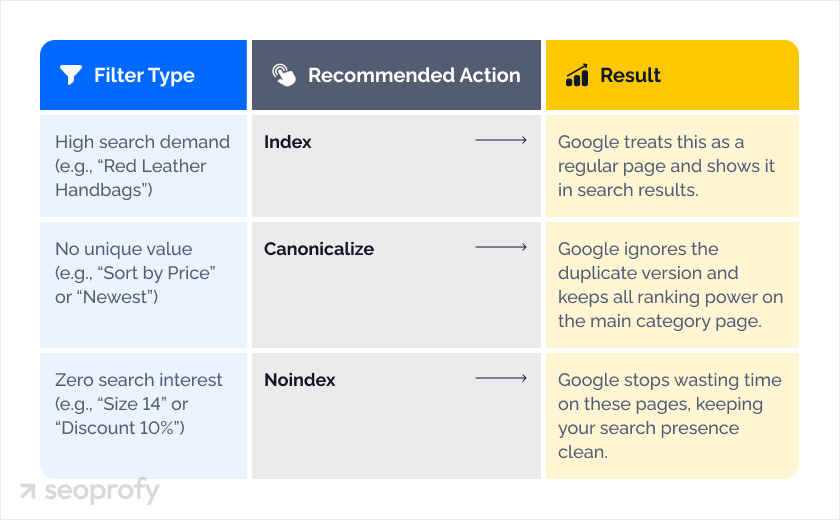
The ecommerce SEO audit will reveal such URLs, and our framework will help you make a correct decision:
| Filter Type | Recommended Action | Result |
| High search demand (e.g., “Red Leather Handbags”) | Index | → Google treats this as a regular page and shows it in search results. |
| No unique value (e.g., “Sort by Price” or “Newest”) | Canonicalize | → Google ignores the duplicate version and keeps all ranking power on the main category page. |
| Zero search interest (e.g., “Size 14” or “Discount 10%”) | Block or Noindex | → Google stops wasting time on these pages, keeping your search presence clean. |
These rules allow your customers to use all the filters for their convenience while keeping Google focused on the pages that actually matter for your business.
Category Page SEO & Search Intent Validation
If a shopper clicks your link in search results and doesn’t see what they expected, they’ll leave immediately. So, the next step in your ecommerce site SEO audit is to check if your categories match the way people shop.
Matching Category Pages to Commercial Search Intent
Search engines look for specific signals to confirm a page is for buying and offers the product the user is looking for. If your page lacks these signals, it won’t appear on top of the search engine result pages for “buy” keywords, even if your technical SEO is perfect.
Check if your category pages align with what shoppers expect by looking at three main areas:
- Immediate product visibility: If a user needs to scroll to see what you’re selling, Google assumes the page is informational rather than commercial.
- Complete shopping data: A category template should display prices, star ratings, and stock status directly in the grid view.
- Helpful content — not filler text: Avoid generic content just to satisfy a word count or spam it with target keywords. Any text on the page should help a customer choose the right product. However, it should still be optimized with keywords that match the commercial intent.
Content Optimization for Scalable Category Templates
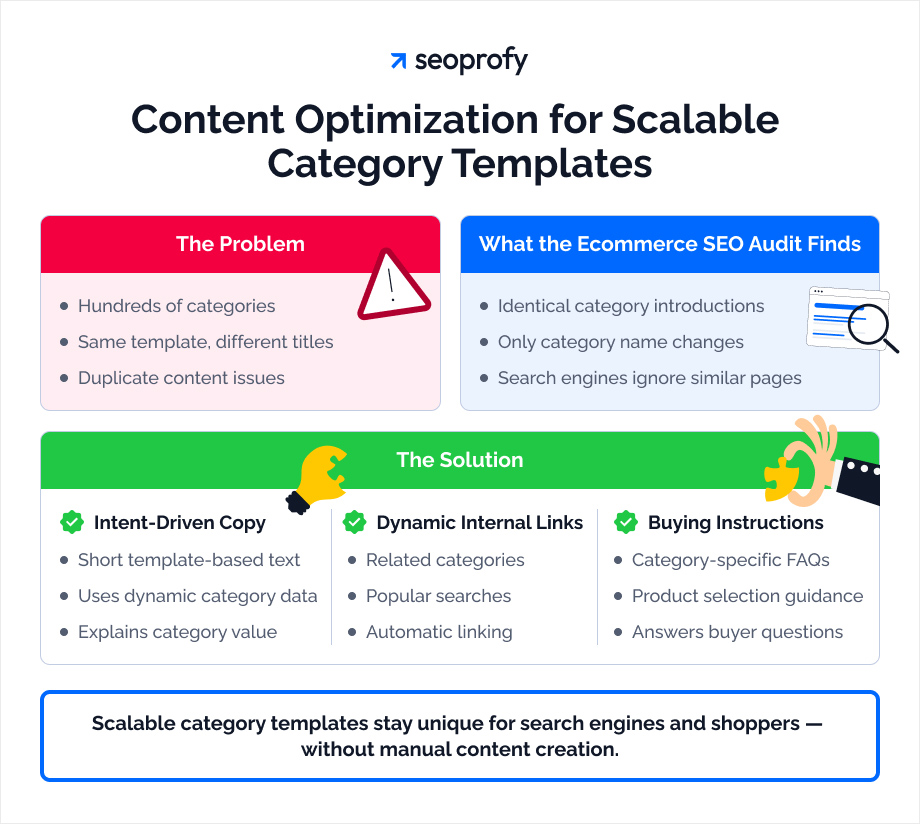
Your online store can have hundreds of categories, and it wouldn’t be feasible to write a unique copy for each one. The goal is to create a scalable template that is unique to search engines and shoppers without requiring manual work.
The ecommerce site SEO audit may reveal basic templates that only change the title (for example, “Buy [Category Name] Online”). Google sees them as identical except for the product list. This results in duplicate content issues. If your “Shoes” and “Boots” categories have the same introduction with only the category name changed, search engines may ignore one of the pages. To avoid this, your template needs to use dynamic, specific data.
Consider creating a category template that includes these elements:
- Intent-driven copy: Short, template-based text explaining the specific value of the category: “Our [Category Name] collection features [Brand A], [Brand B], and [Brand C], with prices starting from [Lowest Price].”
- Dynamic internal links: “Related Categories” or “Popular Searches” sections automatically link the page to similar collections, keeping users engaged and helping search engines discover other pages.
- Buying instructions: Include a Frequently Asked Questions section related to that category, answering product-related questions.
Product Page SEO & Demand Capture
This part of the ecommerce SEO audit reveals whether your product pages manage to capture sales or get ignored by Google due to duplicate content.
Product Page Indexability and Duplication Risks
When your store has hundreds or thousands of individual products, managing their SEO effectively becomes challenging. If you sell an item in five different colors, you might get five different URLs.
If these pages are identical and have the same meta tags, Google may treat them as duplicate content. It may not even index some of the pages it deems duplicated. And if they are indexed and target the same keywords, they compete against each other in search results.
If you detect such issues in your ecommerce website audit, follow our best SEO practices to handle them:
| Scenario | Recommended Action | Result |
| Similar variants (size/color) | Canonicalize to the main item. | Prevents self-competition in search results. |
| Temporarily out of stock | Keep it indexable and add a “Notify Me” sign-up and suggest alternatives. | Retains your search rankings while helping the user. |
| Discontinued product | Set up a 301 redirect to the relevant pages. | Transfers “SEO value” to a relevant, live product. |
| Same item in multiple categories | Use one master URL. | Ensures Google only indexes one version of the page. |
Optimizing Product Pages for Organic Conversion
Product pages convert when they combine search-friendly elements with a clear, user-friendly experience. Key factors include:
- Structured data: This tells Google what you sell so it can show prices, ratings, and stock status directly in search results. Proper markup allows your products to appear across different Google Search surfaces, like the Shopping tab or Google Images. Use Google Search Console, Google’s Rich Results Test, or schema validators to check for missing or incorrect markup.
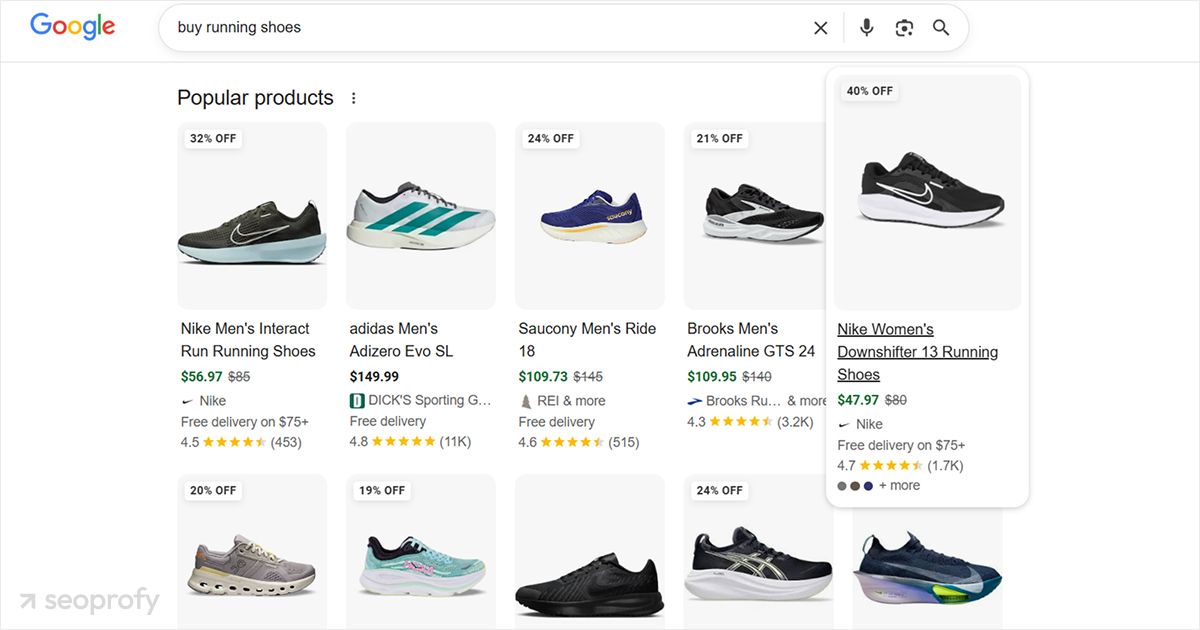
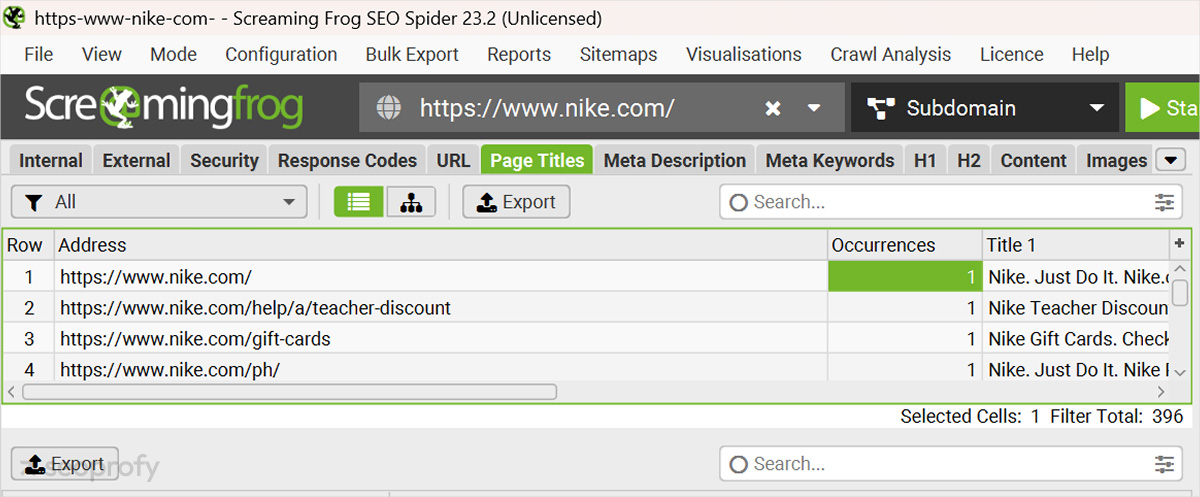
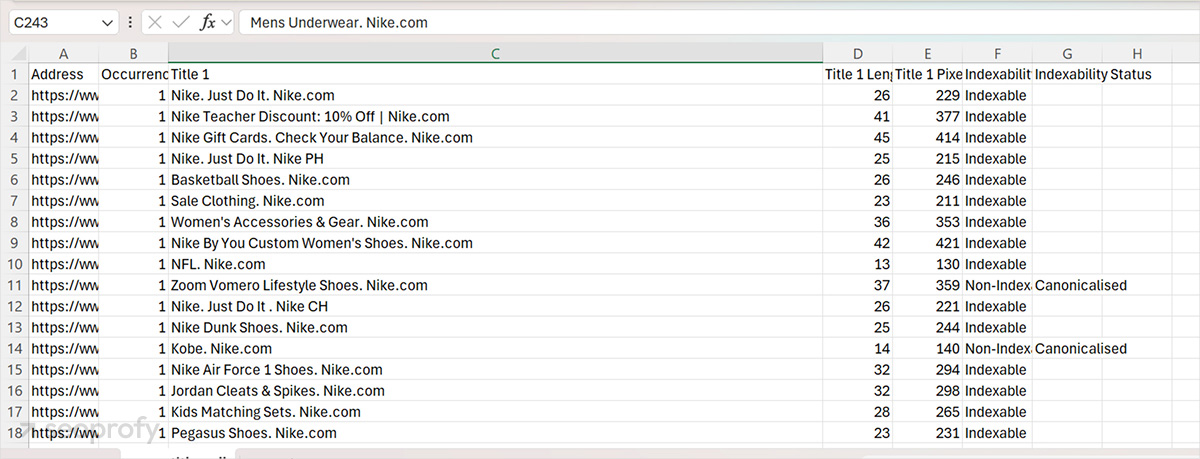
- Meta tags: Make sure your titles and descriptions follow Google Guidelines. Use Screaming Frog SEO Spider or Sitebulb to quickly export and audit these elements and find duplicates or missing tags:
- Content blocks: Clear descriptions, benefits, specifications, and FAQs guide users and improve relevance. Make sure they include product-specific keywords with the right intent in a natural way.
- Internal links: Connect related pages and distribute link authority. Use automated crawlers to identify orphan pages or weak linking.
- UX signals: Site speed, mobile-friendliness, navigation, and prominent calls to action affect engagement and conversions.
Following this simple ecommerce SEO audit checklist to systematically review the page elements, you will ensure every product page is optimized to convert organic traffic into sales.
Internal Linking & Page Authority Distribution
After optimizing your product and category pages, you need to check if ranking power flows effectively between them. At this stage, you should focus on identifying where your site is losing authority and how to build automated internal linking systems that keep your most important products discoverable to search engines.
Identifying Internal Link Equity Leaks
Improper linking prevents “ranking power” (or equity) from reaching your product pages, resulting in low ranking, no matter how good their content is. The linking issue commonly occurs when a site grows but keeps the old navigation that makes high-margin products hidden ten clicks away or only accessible through a temporary “New Arrivals” banner. Search engines will fail to discover them.
To find where your authority is leaking, you should check:
- Orphaned pages: These have zero internal links. Since there is no path to them, search engines and customers can’t find them.
- Underlinked revenue pages: Important products or categories that are only linked from minor parts of the site.
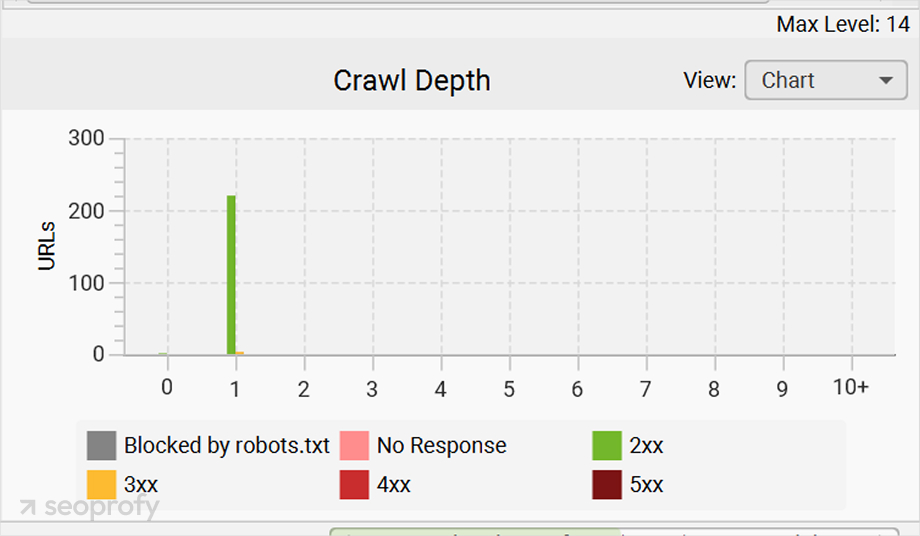
You can identify these equity leaks by looking at your site’s “crawl depth,” for example, with Screaming Frog SEO Spider. If the check reveals key categories are sitting at a depth of five or six, your linking structure is likely preventing them from reaching the top of the SERP.
Building Internal Linking Systems for Ecommerce
To fix equity leaks, you need a system that distributes ranking power automatically. The most effective way to manage internal links is through your site’s shared templates:
- Breadcrumbs: These are the small navigation paths at the top of a page (e.g., Home > Men’s Shoes > Boots). They link back to high-value category pages and help Google understand the relationship of different levels of your ecommerce website.
- Topical blocks: “Customers also bought” or “Similar styles” sections create a system of links between individual items and prevent products from becoming orphaned.
- Mega menus and footers: Your main navigation can link directly to your highest-value categories. However, avoid linking to everything at once, as it will dilute the value.
Not all pages deserve equal attention. Focus more internal links on your top-selling pages. They should be featured in your homepage navigation or a “Top Categories” section in the footer to signal to search engines that these are your most important destinations. This approach ensures that your limited “ranking power” is concentrated where it can drive the most business.
Content Overlap & Keyword Cannibalization
When your ecommerce website targets similar terms across different pages, you risk confusing search engines and splitting your ranking power.
Detecting Cannibalization Across Categories and Products
An on-page SEO audit can reveal keyword cannibalization. It happens when multiple pages target the same search query. Instead of one strong page ranking at the top, Google spreads ranking power equally across them, resulting in a lower ranking for each one.
You might see this conflict in three common areas:
- Overlapping categories: Having both a “Summer Shoes” and a “Sandals” category that feature almost identical products.
- Filter against category: A main “Men’s Jackets” category competing with a filtered URL for “Men’s Jackets — Color: Black.”
- Generic product titles: A product titled “Leather Wallet” competing with the “Leather Wallets” category.
The easiest way to spot this is by looking at your search data and the live SERPs:
- Fluctuating rankings: If you notice a keyword’s positions jumping up and down significantly, it’s because Google is showing two different pages, unsure which one is better.
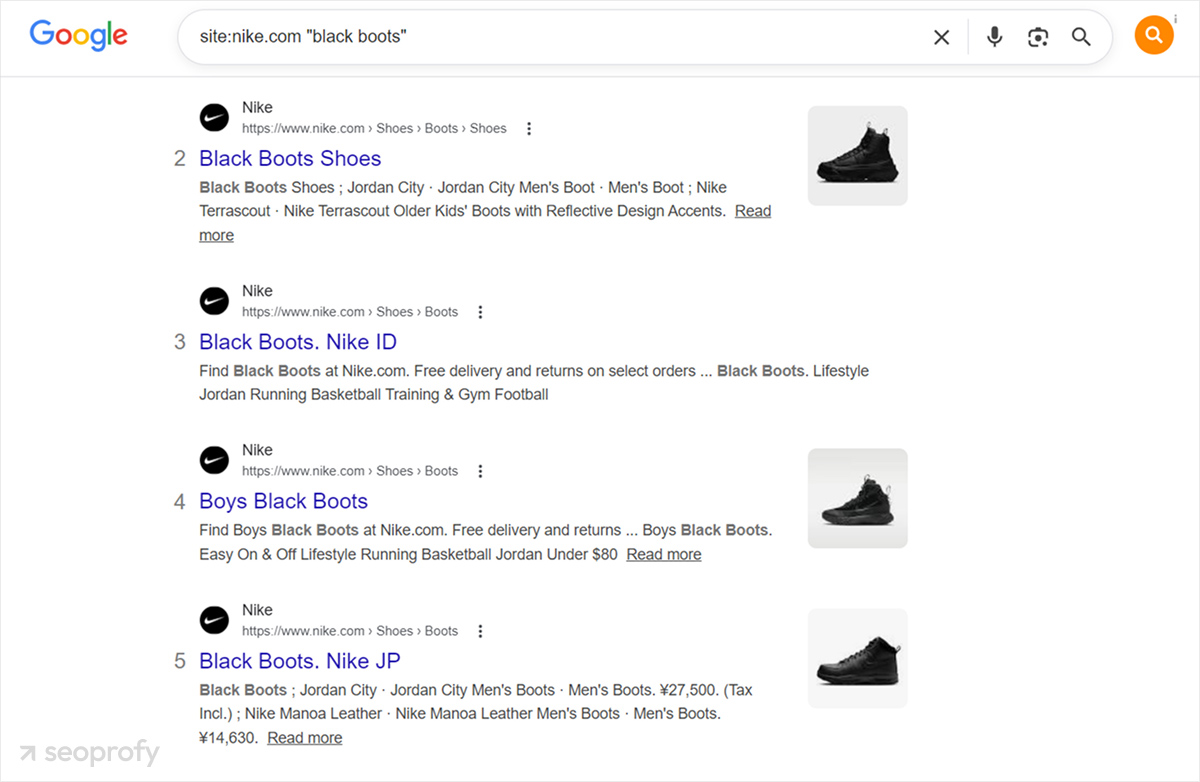
- The “site:” search test: Search for site:yourstore.com “keyword”. If Google finds several pages with similar titles and descriptions, they are likely cannibalizing each other.
- Multiple URLs in Search Console: Check if a target keyword brings traffic to multiple URLs. If two pages receive similar clicks for the same term, they are competing for the same spot.
Conducting this site performance test, you can see where it competes against itself rather than competitors.
Consolidation vs. Differentiation Decisions
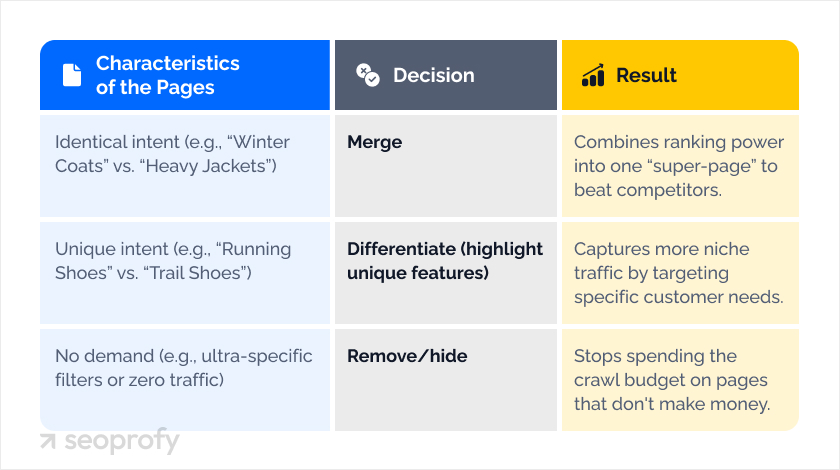
Once you’ve identified pages competing for the same keywords, you need to decide how to fix the overlap. The goal is to ensure every page has a unique purpose. Your decision should be based on whether the pages serve the same intent, if there is enough demand to justify keeping both, and how they are currently performing.
| Characteristics of the Pages | Decision | Result |
| Identical intent (e.g., “Winter Coats” vs. “Heavy Jackets”) | Merge | Combines ranking power into one “super-page” to beat competitors. |
| Unique intent (e.g., “Running Shoes” vs. “Trail Shoes”) | Differentiate (highlight unique features) | Captures more niche traffic by targeting specific customer needs. |
| No demand (e.g., ultra-specific filters or zero traffic) | Remove/hide | Stops spending the crawl budget on pages that don’t make money. |
Technical Performance & UX Signals
Technical performance and UX are two sides of the same coin: high page speed gets users to the page, but good UX keeps them there. Broken links, intrusive ads, or poor accessibility prevent users from continuing their store journey. High bounce rates signal to Google that your site is frustrating.
For a technical SEO audit, check the Core Web Vitals of your site and how well it aligns with the current version of the Web Content Accessibility Guidelines to make it more convenient for all users.
Authority Signals & Link Profile Quality
Authority is your store’s “reputation.” Google counts external links pointing to your site as votes of confidence to decide if you are a trustworthy place to shop. Links from reputable industry blogs, review sites, or news media signal that your store is a leader, while spammy or unrelated links can suggest your site is not trustworthy.
Checking the quality of the link profile is essential for a comprehensive ecommerce SEO audit. Tools like Semrush and Ahrefs provide backlink analysis features. For a general authority overview, these platforms offer domain authority (DA) scores calculated based on several signals. The DA is also helpful when evaluating the quality of your link profile: see how high the referring domains (sites that link to you) score on this metric.
Competitive Landscape & Gap Analysis
Competitive analysis will show you where the competitors are winning and where they underperform. This is important when you audit SEO for ecommerce because it compares your store to top-ranking ecommerce sites, identifying gaps and spotlighting opportunities for optimization.
Look up competitors for your target keywords in SEO tools. You may discover competing traffic-generating buying guides or category filters you haven’t implemented yet. Covering these gaps allows you to prioritize the pages that have already been proven to drive sales in your niche.
Ecommerce SEO Audit Checklist: Prioritization & Execution Roadmap
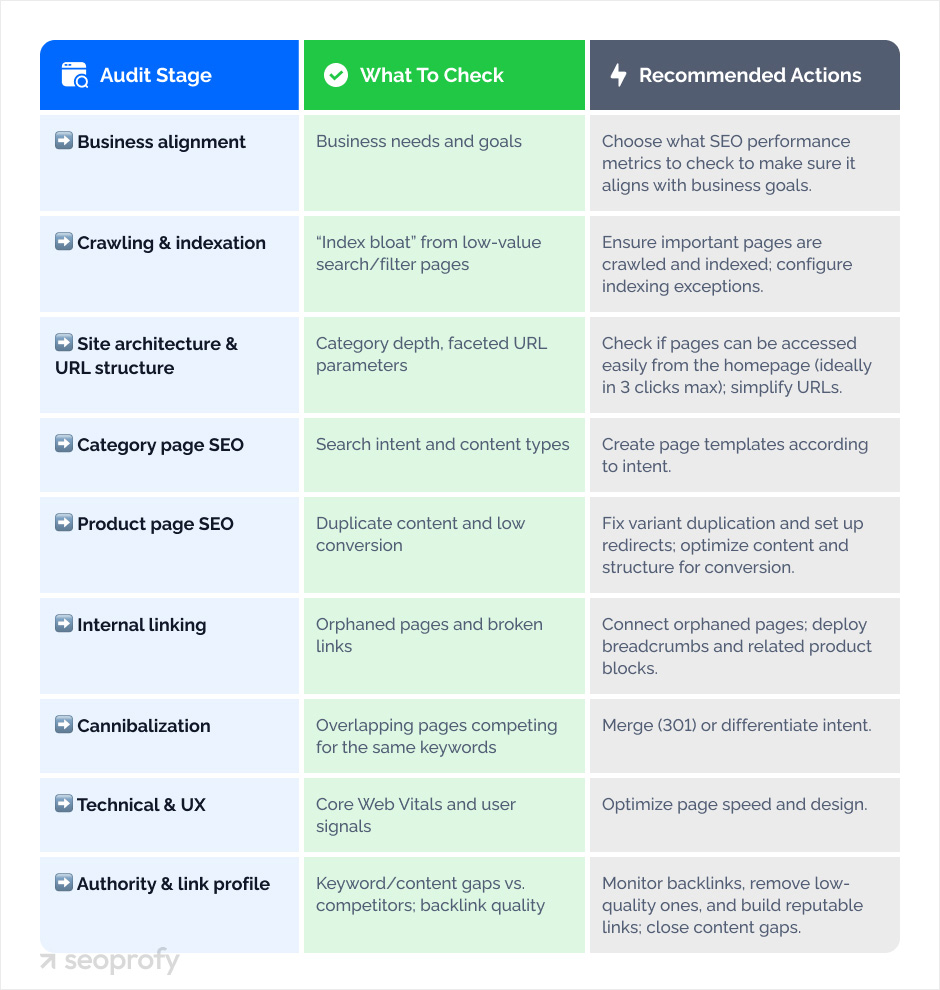
Here is a full ecommerce SEO audit checklist that you can use to conduct a thorough analysis of your online store’s performance:
| Audit Stage | What to Check | Recommended Actions |
| Business alignment | Business needs and goals | Choose what SEO performance metrics to check to make sure it aligns with business goals. |
| Crawling & indexation | “Index bloat” from low-value search/filter pages | Ensure important pages are crawled and indexed; configure indexing exceptions. |
| Site architecture & URL structure | Category depth, faceted URL parameters | Check if pages can be accessed easily from the homepage (ideally in 3 clicks max); simplify URLs. |
| Category page SEO | Search intent and content types | Create page templates according to intent. |
| Product page SEO | Duplicate content and low conversion | Fix variant duplication and set up redirects; optimize content and structure for conversion. |
| Internal linking | Orphaned pages and broken links | Connect orphaned pages; deploy breadcrumbs and related product blocks. |
| Cannibalization | Overlapping pages competing for the same keywords | Merge (301) or differentiate intent. |
| Technical & UX | Core Web Vitals and user signals | Optimize page speed and design. |
| Authority & link profile | Keyword/content gaps vs. competitors; backlink quality | Monitor backlinks, remove low-quality ones, and build reputable links; close content gaps. |
An ecommerce SEO audit is only as good as the fixes you implement after it’s done. You should prioritize tasks based on their potential to drive revenue and their ease of implementation.
Final Audit Summary & Next Steps
A successful ecommerce SEO audit is never a “one and done” task; it is a continuous cycle of on-page SEO and off-page SEO checks, discovering how search engines and customers interact with your store. Instead of increasing vanity metrics, a professional ecommerce site audit prioritizes business goals.
Have you ever wondered how to audit SEO for ecommerce to uncover hidden gaps in your website’s performance? SeoProfy is here to help. As experts in the field, we specialize in auditing large-scale ecommerce stores and developing high-impact, revenue-focused strategies tailored to your specific niche. Check our ecommerce SEO case studies to see how we help ecommerce projects and estimate their results.
Ready to audit your ecommerce website SEO? Contact us!

Bohdan has been an SEO analyst at SeoProfy for more than two years. He began his career in digital marketing in 2019 and has since gained experience helping scale some of the world’s leading brands in industries such as gambling and SaaS. Bohdan specializes in developing effective strategies tailored to specific regions.